
My Home Screen (2026)
Decided to write and share the current home screen setup on my phone! Featuring KISS Launcher, Arcticons and a few more cool apps
It’s been a while since I’ve done a post sharing what my home screen looks like, and a lot has changed since then. Last year I shared what’s on my phone, but it was more of a listicle that didn’t really go into the reasoning behind my choices. In any case, that’s what I plan to do here. at least for the homescreen I got right now!
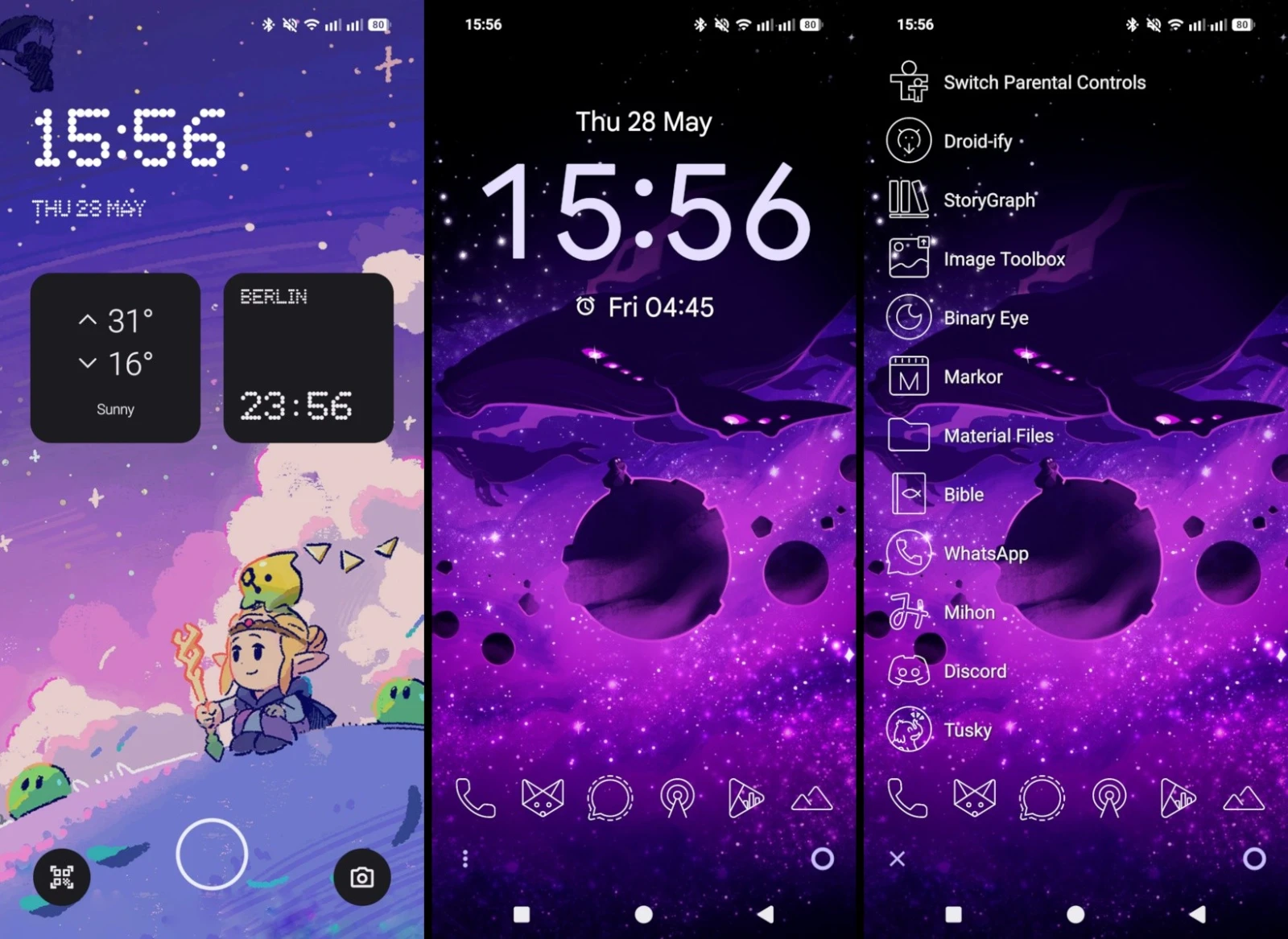
Let’s start with the lock screen. Last time I was using a custom ROM with no way to customize it. However, since I am using a Nothing (3a) with NothingOS, I can add widgets! I have one for the weather and a global clock, both quite handy!
My wallpaper here is some official artwork from The Legend of Zelda: Echoes of Wisdom—a game I have not played yet—I paid some silver points to download it from Nintendo’s rewards page because it’s just adorable and I had to have it. Not much else to comment on.
Now, the home screen itself does not have a lot going on! I am using a wallpaper featuring artwork from Into The Aether that is simply breathtaking to me. Best part? It was kind of made for me by the artist after they shared some versions where the artwork was squared or vertical with the planet at the very top. I wanted it centered and did my own version with Snapseed’s expansion tool. The artist took pity on me and gave me a proper one.
Now, the layout and mitself was made using KISS Launcher, which has been my choice for the last couple of years.
Nova Launcher is what I used back in the day, but after a whole mess that just keeps going, it’s just not worth it anymore.
KISS Launcher offers a minimal template to start building up from. I have the Minimalistic UI turned on, which let’s me add widgets to an otherwise empty screen. I just have a digital clock. I also have a row of favorite apps and the KISS search bar at the very bottom—with a three dot menu to see some settings and an app drawer button.
I set it up with a transparent theme, so it’s as simple as possible.
My row of favorites features six apps. I am starting to become a boring adult, so the first one from left to right is the phone app, I am currently using Fossify Phone, since it does what I need and not much more.
The next one is Fennec, a fork of Firefox for Android that has some extra plugins and honestly works just fine for all of my needs. I prefer to avoid Chromium browsers when I can. Fennec disables some of the telemetry of vanilla Firefox too, although I’ve heard there’s more privacy-focused alternative like IronFox, Ice Raven and iode Browser.
Next up, Signal, my favorite messaging platform. It just works and it has worked for many years now. Thanks to usernames, it has been easier than ever to make groups with the friends I’ve made online. It does everything I want it to do, and it does it very well. I have some other messaging apps but none of them I use as much as this one.
AntennaPod is simply the best podcast app for Android. It’s what got me interested into listening to podcasts in the first place. It has pretty much every feature you may need, and I like to see my stats on it every once in a while.
Besides Podcasts, there’s music! Although I grew fond of my Innioasis Y1, I still listen to music on my phone quite a bit, so I use Booming Music Player for that. I particuarly enjoy its feature to suffle albums (instead of shuffling all the songs and making a mess).
Last but not least, the Fossify Gallery app. It is the fastest and simplest of them all, loads super quick and has every feature I may ever need in a gallery.
Now, besides the minimal home screen, KISS Launcher has a History screen, which displays frequently used apps. These can be sorted in a variety of ways, but I just sort based on frequency, instead of recency, time of day, or other modes available.
Right now, my most frequent apps are the following:
- Tusky - my favorite Fediverse client
- Discord - to chat in the TWG Online server
- Mihon - super cool manga reader I love
- WhatsApp - people in Mexico won’t switch from it
- Bible - I try to read daily and finish it in a year
- Material Files - to access and manage my… files
- Markor - markdown editor for my blogposts and quick notes
- Binary Eye - scanner for barcodes and QR codes
- StoryGraph - book reading app with tracking and socializing
- Image Toolbox - for my weekly collages and other image things
- Droid-ify - app store for all my FOSS apps
- Switch Parental Controls - to track my Nintendo Switch play time.
These change every once in a while but it looks like a pretty accurate list of the sort of apps I use the most.
KISS Launcher has been around for ages. It is, in fact, featured on my very first proper blog post, and even though I have mentioned it in my uses page too, I thought it was worth sharing how my phone looks like thanks to it.
Of course, the icon pack featured here is Arcticons, the one I’ve made contributions to for a long time now, it just has everything I need, and if it doesn’t, I make the icon myself. Good stuff all around!
This is day 72 of #100DaysToOffload
Backlinks
- 500 Days to Offload on July 22, 2026
Comments
If you have something to say, leave a comment, or contact me ✉️ instead
Reply via Fediverse
You can reply on any Fediverse (Mastodon, Pleroma, etc.) client by pasting this URL into the search field of your client:
https://fosstodon.org/@joel/116654734533330376

Are you looking for more? Here's some more great content for those who dare scroll down this section of the page. Suit yourself!


