<?xml version="1.0" encoding="utf-8"?><feed xmlns="http://www.w3.org/2005/Atom" ><generator uri="https://jekyllrb.com/" version="4.4.1">Jekyll</generator><link href="https://joelchrono.xyz/feeds/degoogle.xml" rel="self" type="application/atom+xml" /><link href="https://joelchrono.xyz/" rel="alternate" type="text/html" /><updated>2026-05-14T06:35:12-06:00</updated><id>https://joelchrono.xyz/feeds/degoogle.xml</id><title type="html">joelchrono’s blog</title><author><name>joelchrono</name><email>me@joelchrono.xyz</email></author><entry><title type="html">Degoogled, again, on Android 13</title><link href="https://joelchrono.xyz/blog/degoogled-again-android-13/" rel="alternate" type="text/html" title="Degoogled, again, on Android 13" /><published>2023-01-19T21:47:04-06:00</published><updated>2023-01-19T21:47:04-06:00</updated><id>https://joelchrono.xyz/blog/degoogled--again</id><content type="html" xml:base="https://joelchrono.xyz/blog/degoogled-again-android-13/"><![CDATA[<p>I think I mentioned this in Mastodon <a href="https://fosstodon.org/@joel/108951987077271809">at some point</a>, but for a while I’d been using Google services on my device because I wanted to use some paid apps I had and also see how well did notifications behaved, since apps like WhatsApp and Discord do not work as well because their push notifications rely on Google.</p>

<p>I change roms pretty much every semester, I think I’ve done a lot of posts regarding Android and my tendency to customize it and try out their latest versions using all kinds of roms from MSM Extended, to ArrowOS or CR Droid. I have never even installed LineageOS on this device, simply because I prefer customizability over privacy/security.
At this point, I know what I’m looking for, and what I’m doing. I’ll settle for LineageOS once my device is approaching EOL on most of its official roms. Even so, I’ve lived through tons of unofficial roms in previous phones without a ton of trouble. Most of the time devs simply want to keep alive their device, and I choose to trust them.</p>

<p>Anyways, enough justifying myself for no reason. I installed the rom, I restored my apps, I installed some extra stuff and I was pretty happy. I was still a bit annoyed that notifications would not work in certain apps. I’ve known of MicroG for a long time, I even tried them a couple roms ago by installing them on F-Droid as suggested in the mastodon post I linked. It kind of worked. But the functionality was not as great as I thought.</p>

<p>This time, however, I decided to try again, after I found a Magisk Module to install MicroG, and decided to give it a go. I was pleasantly surprised, because it worked wonderfully, and after enabling its Cloud Messaging for push notifications, the apps started to work just fine, unlike last time. It is quite sad that not that many apps rely on open standards such as <a href="https://unifiedpush.org/">UnifiedPush</a> just yet.</p>

<p>Regardless, now that notifications work perfectly fine on my proprietary apps, which are also containerized in a Work Profile using Shelter (<a href="https://f-droid.org/packages/net.typeblog.shelter/">F-Droid</a> | <a href="https://play.google.com/store/apps/details?id=net.typeblog.shelter">Play Store</a>). I feel really comfortable with my device.</p>

<p>I also found <a href="https://github.com/Mahmud0808/Iconify">Iconify</a> an app that lets me customize my phone’s quick settings, volume and notifications panel with absolute ease, <a href="https://fosstodon.org/@joel/109714722893473225">its super beautiful</a>!</p>

<p>The only problem right now is a bug in my rom that sometimes freezes it to a black screen after waking up the device. It usually happens while playing audio, but I still don’t find a solution and its bothering me <em>just enough</em> that I am considering switching to ArrowOS or something, which also has an Android 13 rom now.</p>

<p>Anyways, those were some thoughts about the latest update on my device’s rom. Thanks for reading!</p>

<p>This is day 19 of <a href="https://100daystooffload.com">#100DaysToOffload</a></p>]]></content><author><name>joelchrono</name><email>me@joelchrono.xyz</email></author><category term="android" /><category term="degoogle" /><category term="foss" /><summary type="html"><![CDATA[Unlike my previous rom, I decided to once again degoogle my device and its going a lot better than ever in my life. There's only a few bugs, but its all right!]]></summary></entry><entry><title type="html">Leaving Google Photos (part 1)</title><link href="https://joelchrono.xyz/blog/leaving-google-photos-1/" rel="alternate" type="text/html" title="Leaving Google Photos (part 1)" /><published>2022-06-07T18:29:25-05:00</published><updated>2022-06-07T18:29:25-05:00</updated><id>https://joelchrono.xyz/blog/leaving-google-photos</id><content type="html" xml:base="https://joelchrono.xyz/blog/leaving-google-photos-1/"><![CDATA[<p>I might have lied with the title a little bit, I don’t really use Google Photos, but I don’t think I will stop using the “Google” part of it. I decided to look for a way to backup all those photos, encrypt them, and then upload them once again to Google Drive. I am writing this while doing this task, so I will be documenting what I’ve done so far, and maybe update you all in a later post.</p>

<h1 id="getting-my-data-back">Getting my data back</h1>

<p>Google offers a <a href="https://takeout.google.com">pretty decent way</a> to download an archive of all the data they got on me (and you). However, I decided to go ahead and do this in a more nerdy way, that also allows me to skip a ton of waiting time and unnecessary files I don’t care about.</p>

<p>When retrieving an archive of Google Photos from Google, they will put it all in a certain file structure and they will duplicate files if you got them in an Album or something else. They will also include a <code class="language-plaintext highlighter-rouge">.json</code> file that contains metadata related to a picture or video of the same name. I wanted to retrieve these files in a more organized manner, and when I found out about <a href="https:/rclone.org">rclone</a> I realized it was pretty good for the job.</p>

<p>Rclone lets me access and manage cloud storage from the terminal, setting it up was not that hard, I used <a href="https://exitcode0.net/backup-google-photos-with-rclone/">this post</a> as a guide.</p>

<p>So you can pretty much run this command to download all of your photos, structured in folders by year, then by months.</p>

<div class="language-plaintext highlighter-rouge"><div class="highlight"><pre class="highlight"><code>rclone copy --progress GooglePhotos:/media/by-month/ ~/Pictures/google-photos-backup/
</code></pre></div></div>

<h1 id="getting-rid-of-duplicates">Getting rid of duplicates</h1>
<p>However, I already had some folder with photos divided by year too locally, and I wanted to merge both folders. For this I went the lazy route and downloaded each folder by year. But anyways, now I can download all of my photos, no problem.</p>

<p>Doing an <code class="language-plaintext highlighter-rouge">ls</code> would output something like this:</p>

<div class="language-plaintext highlighter-rouge"><div class="highlight"><pre class="highlight"><code>❯ ls
drwxrwxr-x  - joel  5 Apr 15:42 screenshots
drwxr-xr-x@ - joel  7 Jun 17:49 pics
drwxrwxr-x  - joel  5 Apr 15:41 videos
drwxrwxr-x  - joel  7 Jun 18:50 by-month
</code></pre></div></div>

<p>All the existing folders probably have duplicated photos that are contained in Google Photos too. So now I got a new problem in my hands.</p>

<p>But not really. Thankfully I am aware of a tool with a kinda hard name to remember.</p>

<h2 id="czkawka-to-the-rescue">Czkawka to the rescue</h2>

<p>Yeah, <a href="https://github.com/qarmin/czkawka">Czkawka</a>, I had to read the GitHub repo name while typing to make sure I got it right. Still, this tool is absolutely great at looking for duplicate files. Not only can it find actual duplicated files, it’s also able to look for similar files, and this is quite a blessing. I won’t explain exactly how it works, but the documentation is quite decent and Mental Outlaw <a href="https://youtu.be/CWlRiTD4vDc">made a video about it</a>.</p>

<p>I had already done a similar process before, but while doing so I had compressed most of the files with ImageMagick. However, this messed up the metadata and modification dates, which is not a big deal, but I wanted to try and keep the file as original as possible (even if Google already compressed it somewhat).</p>

<p>The tool (I refuse to type its name again), allows me to look for similar pictures and from all the options, automatically select the oldest one for all the matches it finds, which pretty much means I’ll have the original file always.</p>

<h1 id="thats-the-progress-so-far">That’s the progress so far</h1>

<p><del>By the way, while typing this I noticed an error which is not actually a bad thing for me. Rclone seems to not be downloading shared pictures and videos. And this is fantastic, because at some point in 2018 I followed a Wallpapers shared folder and it got absolutely <em>flooded</em> with thousands of photos that didn’t even fit my style, so that’s great for me, but I can understand if its somewhat annoying, there is probably a way to fix this, but its fine as is for me.</del></p>

<p>Looks like rclone retried the download and its downloading them just fine. Anyways I had already dealt with that problem before, most of them start in the same way so I can just do an <code class="language-plaintext highlighter-rouge">rm start_of_file_*</code> to get rid of most. Well not everything can be how you want it I guess.</p>

<p>According to Google itself, I only use around 2GB of Google Photos, that’s quite interesting, because it means that most of my backup is as big as it is (around 10GB) <em>because</em> of those freaking wallpapers. Also a lot of photos for that one time I logged in to my mom’s phone, quite painful.</p>

<p>I am still downloading things, so I will do another post later, maybe in the same day, I don’t know.</p>]]></content><author><name>joelchrono</name><email>me@joelchrono.xyz</email></author><category term="degoogle" /><category term="selfhost" /><category term="linux" /><category term="personal" /><category term="project" /><summary type="html"><![CDATA[Photo management and search is one of Google Photos' best features, but I don't like to have all my stuff in one basket. So I decided to look for a different way to backup my memories and protect them from outsiders.]]></summary></entry><entry><title type="html">Logging out of YouTube</title><link href="https://joelchrono.xyz/blog/logging-out-of-youtube/" rel="alternate" type="text/html" title="Logging out of YouTube" /><published>2022-03-14T22:03:00-06:00</published><updated>2022-03-14T22:03:00-06:00</updated><id>https://joelchrono.xyz/blog/logging-out-of-youtube</id><content type="html" xml:base="https://joelchrono.xyz/blog/logging-out-of-youtube/"><![CDATA[<p>Ever since I read yet another post by <a href="https://fosstodon.org/@edel">Edel</a> about how she has watched <a href="https://web.archive.org/web/20220520002922/https://erzadel.net/why-ive-been-watching-less-youtube-videos/">less YouTube videos over time</a> I too wanted to put some thought into my usage of the service.</p>

<p>I have not watched as many videos lately, because I have been reading books and manga quite a lot, and I recently entered my community service at University (basically I work for them for free). But I still decided to take some action to reduce my temptation to lose myself into YouTube rabbit holes, since I know that even if its not a problem now, it is bound to happen in the future, as it has happened many times, despite my previous efforts.</p>

<h1 id="changing-youtube">Changing YouTube</h1>

<p>The first thing I tried was installing an add-on that I heard of in, well, a YouTube video about distractions and such (I probably kept watching videos about that topic for a while…) named <a href="https://addons.mozilla.org/en-US/firefox/addon/df-youtube">DF YouTube</a>, which allows you to have a <em>distraction free</em> experience by disabling the feed, comments, recommendations, etc. However, the extension has not been updated in a while, and I realized I can just block those elements using UBlock Origin.</p>

<p>My main focus was to look at YouTube as its most essential form: a <strong>search engine</strong>. I only left a search bar for the main page, and the video frame, description and comments for each video page. It was all looking pretty nice, I also added the Return YouTube Dislike extension, because its nice.</p>

<p>At some point I restored the discover page because I tried another extension that allowed me to group subscriptions and keep track of them without an account, named <a href="https://yousub.info/">PocketTube</a>, and it didn’t show its custom feeds if I disabled the whole thing.</p>

<h1 id="changing-browser-settings">Changing Browser settings</h1>

<p>Another thing I decided to do a while ago, and came quite handy now, was deleting all cookies and site data from my browser (which is still Firefox) by default, so I only white-list the websites I actually use. I decided to log out and remove YouTube from the white-list, I also assigned a Firefox container for it, so its pretty much unable to track my movements outside of itself.</p>

<p>However, after a couple searches or links clicked on a browser session, I can tell YouTube figures out some stuff and shows things that are actually atractive to me. Restarting the browser session can fix it, but realizing how effective it was at fingerprinting my interests, I decided to take this a step further and stop using youtube.com altogether.</p>

<h1 id="using-an-alternative-front-end">Using an alternative front-end</h1>

<p>There are YouTube alternatives such as <a href="https://odysee.com">Odysee</a> and <a href="https://joinpeertube.org/">Peertube</a>, but there is just not enough content for my taste, I know the purpose of all of this is to restrain my YouTube consumption, but not to such a degree just yet.</p>

<p>I already knew about <a href="https://github.com/iv-org/invidious">Invidious</a> and other YouTube front-end alternatives,  but I went for a <a href="https://github.com/TeamPiped/Piped/">Piped</a> instance I was already using before. There are also things like <a href="https://freetubeapp.io/">Freetube</a> which is a native client available for Linux (and others), but I’d never had any luck with it, since it slowed down when importing my Newpipe subscriptions and was quite buggy for me.</p>

<p>The Piped front-end is quite light, and it worked just fine, so I decided it was worth using instead of a client. There are also some bash scripts, rofi scripts that use mpv and such, but I didn’t feel like going that far.</p>

<p>Also, while writing this, I decided to check out some invidious instances and realized they are not as slow as they were months ago when I first tried it, so I might consider switching to it instead, although as I said, Piped is a lot more minimal.</p>

<h1 id="what-about-android">What about Android?</h1>

<p>Well, if you asked that question yesterday, I would have probably told you to go with Youtube Vanced.</p>

<p>But <a href="https://nitter.net/YTVanced/status/1503052250268286980">YouTube Vanced is dead</a>. Going back to Newpipe then!, I actually prefer it over Vanced, but it has some problems on Android 12, which I use, so PiP doesn’t work as well and takes over the entire screen, disabling touch for everything under it. There is an adb command I used to fix it <del>(I don’t remember it now)</del>:</p>
<div class="language-bash highlighter-rouge"><div class="highlight"><pre class="highlight"><code>adb shell settings put global block_untrusted_touches 0
</code></pre></div></div>
<p>Now I can use it just fine now again, even if its still a bit less polished than Vanced and the official app. Also, keep in mind that this command can <strong>leave you vulnerable to malware.</strong></p>

<p>There is another very promising client that uses the proper PiP API and works wonderfully, named <a href="https://songtube.github.io/">SongTube</a> which has an awesome user interface and is a bit more suited for music (as the name implies). Sadly, it doesn’t have a way to import subscriptions, which is the reason I haven’t fully switched to it, but if you don’t mind, I recommend giving it a try.</p>

<h1 id="wrapping-up">Wrapping up</h1>

<p>YouTube is such an incredible tool, but it had turned into quite a problem for me, with suggestions and tracking that, even though I was aware of it, I chose to bear with it because of how good it is at knowing what I want.</p>

<p>I might still struggle to leave it behind, I know returning to its intended experience (minus the ads, clearly) is just a few clicks away for me, I could just keep using it as is, enjoy it, spend hours on it and tell nobody, but I really want to stop that.</p>

<p>There are tons of Vanced users migrating to Newpipe and asking for ways to log in, leave comments and even get their recommendations tab back. I know I can’t force anyone to stop depending on the algorithm, some might have legitimate reasons. But, regardless, this is what I chose to do, and I hope it helps others who are also struggling with this. Let us be the ones in control instead of delegating our consumption habits to some soulless algorithm.</p>]]></content><author><name>joelchrono</name><email>me@joelchrono.xyz</email></author><category term="lifestyle" /><category term="detox" /><category term="degoogle" /><summary type="html"><![CDATA[During the last couple of days I had been looking for ways to get rid of YouTube's influence on me as much as possible, also, Vanced died]]></summary></entry><entry><title type="html">Switching to DietPi and selfhosting everything</title><link href="https://joelchrono.xyz/blog/switching-to-dietpi-and-selfhosting-everything/" rel="alternate" type="text/html" title="Switching to DietPi and selfhosting everything" /><published>2022-01-04T12:01:29-06:00</published><updated>2022-01-04T12:01:29-06:00</updated><id>https://joelchrono.xyz/blog/switching-to-dietpi-and-selfhosting-everything</id><content type="html" xml:base="https://joelchrono.xyz/blog/switching-to-dietpi-and-selfhosting-everything/"><![CDATA[<p>I have been playing around during the last few days with my Raspberry Pi, this is because I decided to move to a distro known as DietPi, which has a bunch of preexisting scripts that setup a bunch of services for you.</p>

<p>I decided to go with Nextcloud, FreshRSS, Jellyfin, Gitea, qBittorrent, and a few others, which I just had to select in a menu, and after a few moments of waiting for the scripts to run, all I had to do was go ahead and access the services from Firefox.</p>

<p>The only problem I had was that the built-in WiFi was not working, but after a bit of research and messing with some scripts and rebooting, it finally worked just fine. I would love to tell you exactly how to fix it, but I was not recording what I did. I just duckduckgo’d stuff, edited scripts, returned back to normal and it somehow fixed itself.</p>

<p>I have been adding stuff to my Jellyfin server, as well as installing apps on Nextcloud and other things. I gotta say, it has been quite fun, and I kinda forgot about the time limit I have to finish my challenge, so I decided to write up something quick, maybe tomorrow I’ll have a more substantial post, but this one is rather short.</p>

<p>Jellyfin is actually amazing, Nextcloud just works, it feels a lot faster now than my previous install too. I also switching from Zerotier to Tailscale, just because Wireguard is kinda cool, and Tailscale is based on it.</p>

<p>Anyways, this has been day 73 of <a href="https://100DaysToOffload.com">#100DaysToOffload</a></p>]]></content><author><name>joelchrono</name><email>me@joelchrono.xyz</email></author><category term="selfhost" /><category term="degoogle" /><summary type="html"><![CDATA[I decided to move over my Raspberry Pi distro to try out selfhosting the easy way]]></summary></entry><entry><title type="html">Self-hosting Nextcloud</title><link href="https://joelchrono.xyz/blog/self-hosting-nextcloud/" rel="alternate" type="text/html" title="Self-hosting Nextcloud" /><published>2021-12-26T17:00:00-06:00</published><updated>2021-12-26T17:00:00-06:00</updated><id>https://joelchrono.xyz/blog/self-hosting-nextcloud</id><content type="html" xml:base="https://joelchrono.xyz/blog/self-hosting-nextcloud/"><![CDATA[<p>So, as I previously stated, I am very happy I got to have a Raspberry Pi, it is the kind of gadget I would have loved to have earlier in my life to play around with doing cool stuff. Being introduced to Linux some year early could have had quite a great impact on my life, and I only wonder what my today could’ve been.</p>

<p>But anyways, I am happy with how things have turned out, since I can still have fun and experiment with what I got today. So since my semester is over and I no longer have an academic use for my Raspi right now, I decided to set it up as a Nextcloud server for my family and personal use.</p>

<p>I have selfhosted a lot of cool services on my Pi <a href="https://fosstodon.org/@joeligj12/106891573076715442">in previous times</a>. Stuff like Radicale, Miniflux or Pi-hole. But because of University, I ended up losing all of them because of some problems that made me have to reinstall my OS, I wasn’t happy about it, but I was running a distro that had some missing packages, so I wouldn’t be able to do my school projects unless I distro-hopped.</p>

<p>The point is, I decided to follow <a href="https://pimylifeup.com/raspberry-pi-nextcloud-server/">this tutorial</a>, and after finally figuring out how to enable PHP8 on my apache server, I got it all working just fine. I won’t be able to really explain everything, but the tutorial covers it quite well and the part of enabling modules is a matter of looking it up (<code class="language-plaintext highlighter-rouge">a2enmod</code> is the command needed).</p>

<p>The problem now was, how do I access it from outside my LAN? I had already said  many times that I could not open my router ports since I am behind a NAT and as such, I can’t really access my public IP and forward ports or stuff like that.</p>

<p>However, I discovered a tool/service called ZeroTier that basically let’s me be own boss and create my own network of devices. I didn’t even need to look up at a tutorial to figure how it works. <del>But if you want one, <a href="https://pimylifeup.com/raspberry-pi-zerotier/">there you go</a></del>.</p>

<p>Now all I had to do was download the app for my phone that works like a VPN and gives me access to my Nextcloud instance from anywhere in the world. The app is FOSS, But it isn’t on F-Droid, so I went with the <a href="https://github.com/kaaass/ZerotierFix">a fork of it</a>, just to have it my way and get it via <a href="https://apt.izzysoft.de/fdroid/repo/net.kaaass.zerotierfix_8.apk">IzzyOnDroid’s repo.</a></p>

<p>So yes, I now have my own instance of Nextcloud. Right now I’m only using my SD card to store everything, but I am planning on getting a 2TB external SSD to be able to mount it and get more storage for it.</p>

<p>This is day 66 of <a href="https://100DaysToOffload.com">#100DaysToOffload</a></p>]]></content><author><name>joelchrono</name><email>me@joelchrono.xyz</email></author><category term="selfhost" /><category term="raspberrypi" /><category term="project" /><category term="foss" /><category term="privacy" /><category term="degoogle" /><summary type="html"><![CDATA[After my classes using my Raspberry Pi for many handy projects, I decided to now use it as a Nextcloud server, and I might try and set it up for other things as well]]></summary></entry><entry><title type="html">New section, the software I use!</title><link href="https://joelchrono.xyz/blog/software-i-use/" rel="alternate" type="text/html" title="New section, the software I use!" /><published>2021-06-02T16:06:11-05:00</published><updated>2021-06-02T16:06:11-05:00</updated><id>https://joelchrono.xyz/blog/software-i-use</id><content type="html" xml:base="https://joelchrono.xyz/blog/software-i-use/"><![CDATA[<p>This is going to be a quick blog where I just wanted to mention how I added
this new section to my website, I already spent quite some time editing it, so
I guess I can make this blog shorter than the rest.</p>

<p>Inspired by <a href="https://fosstodon.org/@PsychoLlama">PsychoLama</a> and by <a href="https://fosstodon.org/@celia">Ru Singh</a>, who have a “Recommendations” and
a “Uses” section respectively on their sites. I wanted to do the same, and decided to
get started on it as quick as possible.</p>

<p>Right now its still fairly incomplete, but I can update it when deemed
necessary, not only for new software I discover, but for the programs I stop
using.</p>

<p>This idea came out of the blue, I did not have a school class and
decided to go for it. It might as well be the most unplanned post yet.</p>

<p>I want to add some new sections in the future, a blogroll, a reading list, a
Now section, so many things to do. I will make a post whenever that happens.</p>

<p>Besides, the last couple months have been quite short on content,
and I wanted to add some extra entries to  keep up with the
<a href="https://100DaysToOffload.com">#100DaysToOffload</a> challenge. Although at this
rate I feel confident I will complete it in less than a year!.</p>

<p>This has been day 40, almost halfway there!</p>]]></content><author><name>joelchrono</name><email>me@joelchrono.xyz</email></author><category term="android" /><category term="linux" /><category term="degoogle" /><category term="foss" /><category term="short" /><summary type="html"><![CDATA[If you look at the top section of this website, you will see a new "Uses" section, check it out if you want to know some of the software I use.]]></summary></entry><entry><title type="html">Rambling about tech and my lifestyle</title><link href="https://joelchrono.xyz/blog/tech-on-my-life/" rel="alternate" type="text/html" title="Rambling about tech and my lifestyle" /><published>2021-02-18T15:20:00-06:00</published><updated>2021-02-18T15:20:00-06:00</updated><id>https://joelchrono.xyz/blog/tech-lifestyle-stuff</id><content type="html" xml:base="https://joelchrono.xyz/blog/tech-on-my-life/"><![CDATA[<p>So recently I have been thinking around the way I think and use technology and software, the way I apply it to my life (not really tbh). There are certain aspects of my mindset that I consider very important, I have been applying some of them ever since I got my first piece of technology, and others have become more and more important for my life as time goes on.</p>

<p>All of these have some things in common, but sometimes the way current technology has evolved makes them hard to combine. I don’t really have an organized way to talk about this, but I will do my best.</p>

<h2 id="digital-minimalism">Digital minimalism</h2>

<p>This is one of those topics that got big on Youtube and other places last year, and is still going strong. Applying a minimalist mindset to the technology around me is supposed to help achieve a simpler digital life, have less distractions and more time to focus on what actually matters. Some of the ways to become a digital minimalist, are these ones.</p>

<ul>
  <li>Get rid of unnecessary applications</li>
  <li>Disable notifications</li>
  <li>Enable downtime mode (black &amp; white screen)</li>
  <li>Limit social media and app usage</li>
  <li>Use Cloud storage, organize folders, etc.</li>
</ul>

<h2 id="privacy-and-security">Privacy and Security</h2>

<p>I have started to care about this more and more. Ever since beginnings of last year that I installed Linux, as well as started to use alternative social media such as Mastodon. I cared about new and interesting topics that are starting to get a bit more recognized, but also get some backlash.</p>

<p>Decentralization, Free and Open Source Software, avoiding Google and big companies, avoiding mainstream social media, etc.</p>

<p>All of these factors have shaped the way I see society and the Internet today, and it is quite a big reason to why I made this blog.</p>

<h2 id="customization">Customization</h2>

<p>Ever since I got my first android phone, I started caring about this, I learned about Icon packs, about android launchers, rooting, custom roms, custom kernels.</p>

<p>The abilities to change almost everything I wanted about my phone, is something I’ve loved from android since I got one.</p>

<p>It is also a good reason I started to care about FOSS too, since I also like to find alternatives to common apps, like Gmail, Facebook, the default gallery and so on. Thanks to that I found out about 3rd party clients (Frost, Twidere,) and alternative apps (Simple Gallery, Bromite) that were more customizable, and better overall.</p>

<p><em>Side note: I actually just remembered that I started customizing Windows XP quite a lot even before I got a phone, I also remember changing my MSN Messenger themes or how my Hotmail account was organized, so yeah, I have liked customization quite a lot.</em></p>

<h2 id="social-media">Social media</h2>

<p>I first started a Facebook account because I needed it on order to play a mobile game, I did it in secret, since I was not allowed to have one at the time (I hid the secret for 3 or so years, I felt so bad during that time, that I actually didn’t use it and I stopped playing the game after a week).</p>

<p>Thats how everything started, but years ago, after I confessed what I did,  there was this time I wanted to be using social media to get attention and stuff (like every teenager), you know, uploading photos of my origami figures, or videos doing magic tricks and stuff that I liked. I was in groups of other people sharing their own videos and photos and stuff like that. After a while I realized how terrible Facebook was for my own good, since I spent so much time there and it wasn’t worth it.</p>

<p>However, after leaving Facebook behind, I started using Reddit, Instagram, Twitter, and Youtube even more, until I adopted a more minimal digital life (kinda?).</p>

<h1 id="what-was-my-point-again">What was my point again?</h1>

<p>I think this got a bit convoluted and I don’t really remember what I wanted to say at this point. I have been thinking about this and I kinda wanted to let it out.</p>

<p>I think I just wanted to spread the cards and see the way I am currently working. I am still trying to get a better workflow. For example, I still rely on services such as Google Docs or Google Drive (Digital minimalism, decluttering, etc), at the same time, I don’t want to use Google apps on my device in favor of F-Droid and FOSS (security and privacy), however, I like to have my phone rooted and with a custom rom (customization, freedom). All of this while I worry about how people around me still don’t switch from WhatsApp, even tho I still don’t delete Facebook nor Instagram, but maybe I should not and just use them in a different manner?.</p>

<p>Sometimes I just want to not care about anything and do whatever I want to do, as well as let other go on. But at the same time I don’t want to look like a victim, or as if I am suffering because of taking this path. I want more people to know about this, not to stay away from it. I dont even know what I am saying now. This has been day 14 of <a href="https://100daystooffload.com">#100DaystoOffload</a>, and I hope that I talk about some of these topics at some point in a way that makes better sense.</p>]]></content><author><name>joelchrono</name><email>me@joelchrono.xyz</email></author><category term="android" /><category term="foss" /><category term="lifestyle" /><category term="linux" /><category term="degoogle" /><category term="thoughts" /><category term="ramble" /><category term="detox" /><summary type="html"><![CDATA[How I am using tech, social media on my life? and I dont even know what else I am saying, oh, yes, FOSS too!]]></summary></entry><entry><title type="html">Changing my android ROM once again</title><link href="https://joelchrono.xyz/blog/changing-android-rom/" rel="alternate" type="text/html" title="Changing my android ROM once again" /><published>2021-02-16T11:49:00-06:00</published><updated>2021-02-16T11:49:00-06:00</updated><id>https://joelchrono.xyz/blog/changing-rom-again</id><content type="html" xml:base="https://joelchrono.xyz/blog/changing-android-rom/"><![CDATA[<p>So as I stated before in the page <a href="/about">about me</a> I am a bit of an android power user.</p>

<p>Last month I was using MSM Extended, with minimal Gapps and stuff like that. However, today a new update for a different ROM happened. And I could not contain myself, so I decided to give ArrowOS a try.</p>

<p>LineageOS is known for being the main custom ROM out there, but besides privacy and such, I also want to have a nice level of customization, so most of the time Lineage its not enough for my needs.</p>

<p>Now, the ROM is not really that important if you are still using Google services, so I have decided to go almost googleless this time, and I decided to share with you the main applications I am going to be using this time.</p>

<p>I was quite happy to see that Simple Gallery and DuckDuckGo were preinstalled, two great open source apps, Although I have a different browser choice.</p>

<p>Migrate is the tool of choice to do backups of contacts, SMS messages and app data. So I fired it up to get a few of my previously installed apps back. Most of the times I backup absolutely every app I have installed, but honestly, I wanted to go for something not only googleless, but less distracting and more minimal.</p>

<h3 id="apps-i-wont-install">Apps I wont install</h3>

<p>In my previous ROM a lot of apps were installed that I really wanted to get rid of and survive without them. These is a list with some of them.</p>

<ul>
  <li>Spotify</li>
  <li>Youtube Vanced</li>
  <li>Google Apps and Services</li>
  <li>Solid Explorer</li>
</ul>

<h3 id="apps-i-am-keeping">Apps I am keeping</h3>

<p>These are a few apps that are not really open source, but I am keeping for the sake of entertainment, or are actually necessary, or are simply trustworthy for me:</p>

<ul>
  <li>Nova Launcher</li>
  <li>Twisty Timer</li>
  <li>WhatsApp</li>
</ul>

<h2 id="school-is-coming-google-is-approaching">School is coming, Google is approaching…</h2>

<p>In my country, we will be back to University classes in a few days (Yes I have been on vacation up until now, kinda cool at first, but not really anymore, this blog is one of the few things keeping me sane). This means that I will have to use applications such as Google Classroom and Meet, and their Calendar too, but I am going to try and keep all of those Google programs away from my device, and in their own Firefox container (what a great add-on to be honest) from my laptop, since sadly they are unavoidable.</p>

<p>So yeah!, this has been day 12 of <a href="https://100daystooffload.com">#100DaysToOffload</a>, please let me know if you are using any FOSS applications to stay away from Google and such, thanks for reading!</p>]]></content><author><name>joelchrono</name><email>me@joelchrono.xyz</email></author><category term="lifestyle" /><category term="android" /><category term="foss" /><category term="degoogle" /><summary type="html"><![CDATA[I have changed my rom again and degoogled my device despite going back to school]]></summary></entry><entry><title type="html">Is Newpipe better than YouTube / Vanced?</title><link href="https://joelchrono.xyz/blog/newpipe-over-vanced/" rel="alternate" type="text/html" title="Is Newpipe better than YouTube / Vanced?" /><published>2021-02-07T15:00:00-06:00</published><updated>2021-02-07T15:00:00-06:00</updated><id>https://joelchrono.xyz/blog/newpipe-better-than-vanced</id><content type="html" xml:base="https://joelchrono.xyz/blog/newpipe-over-vanced/"><![CDATA[<h1 id="trying-to-avoid-youtube-">Trying to avoid Youtube 🎥</h1>

<p>On my journey towards being googleless, there is one service that has no match: Youtube. This site has the biggest catalog of videos. But, as great as it is, it also represents one of the main ways for Google to get revenue, serve ads and collect data from it’s users, which is  big problem for people like me, looking for a way to stop them from getting every bit they can about my life.</p>

<figure class="img">
  <picture>
    <source srcset="/assets/img/blogs/2021-02-07-youtube.webp" type="image/webp" />
    <source srcset="/assets/img/blogs/2021-02-07-youtube.jpg" type="image/jpeg" />
    <img class="mx-auto" src="/assets/img/blogs/2021-02-07-youtube.jpg" alt="Youtube on a laptop in the dark" />
  </picture>
  <figcaption class="caption">Photo by <a href="https://unsplash.com/@leon_bublitz">Leon Bublitz</a> on <a href="https://unsplash.com/?utm_source=unsplash&amp;utm_medium=referral&amp;utm_content=creditCopyText">Unsplash</a></figcaption></figure>

<p>Even if you don’t consume its content with entertainment purposes, you will probably need it for tutorials, or streaming events, or to sub to your friend’s channel.</p>

<p>I need Youtube, that’s how I learn stuff, that’s where my teachers upload their homework videos. And in times like these, it’s honestly the primary way of entertainment I have.
That’s one of the reasons I made this blog too. To use my time for something more productive, growing this site of mine and making it as nice as I can. At the very least, I am typing a lot more and with better grammar (don’t @ me).</p>

<h1 id="moving-to-newpipe-️">Moving to Newpipe ▶️</h1>

<p>When I discovered Youtube Vanced, I was really happy, I had a way to consume Youtube without ads and, recently, without Sponsors. And yes, that was pretty convenient for me, but I still needed an account linked to the app if I wanted access to my Subscriptions.</p>

<p>So yeah, I was still being watched by Google, and it was not until a week ago, that I decided to do the full switch, and I installed <a href="https://newpipe.net/">Newpipe</a> due to some <a href="https://fosstodon.org/@joeligj12/105647071925704720">interactions</a> on my Mastodon instance.</p>

<p>So, when I did the switch, I started from scratch. A few years ago, Youtube offered a way to get your subscriptions on a OPML file, but they made it harder recently. Newpipe provides you with instructions to recover them if you so choose. However, I decided not to do it.</p>

<h2 id="decluttering-my-subscriptions-️">Decluttering my subscriptions 🗑️</h2>

<p>I have used Youtube for years. Last time I exported my subscriptions, I had 1000+ subscriptions, some channels did not even exist anymore, and I did not recognize most of them. Back then I removed my subscription from a lot of channels, but I am probably reaching the same amount today.</p>

<p>I decided to look up every channel I actually remembered, and “subscribing” to them (you don’t really subscribe since the subs number doesn’t go up) and ended up with around 60 channels, which I currently follow. 
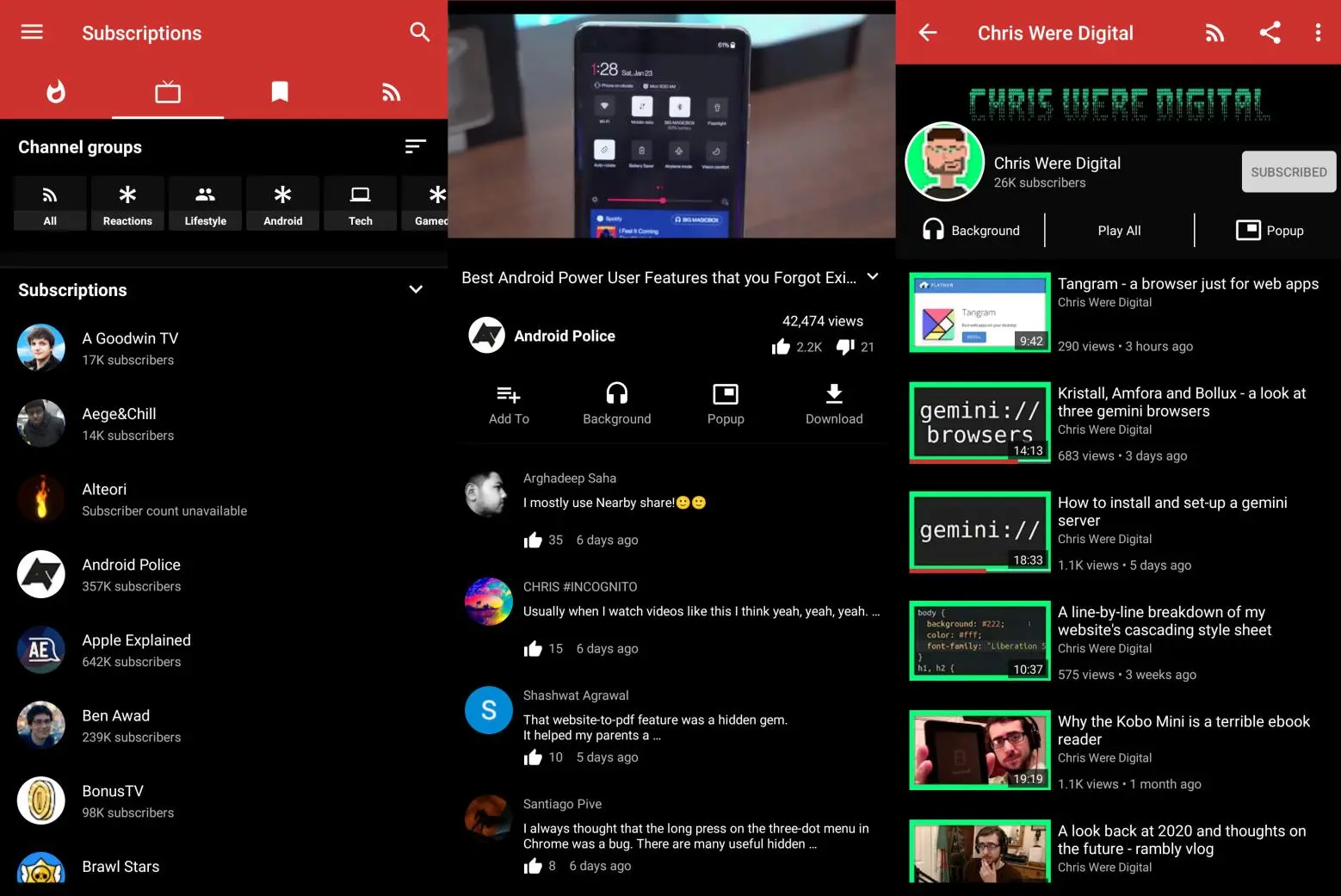
After that, I decided to categorize them. Newpipe currently has a limited support on custom tabs, but it shows the groups in little icons at the top of the subscriptions page.</p>

<figure class="img">
  <picture>
    <source srcset="/assets/img/blogs/2021-02-07-newpipe.webp" type="image/webp" />
    <source srcset="/assets/img/blogs/2021-02-07-newpipe.jpg" type="image/jpeg" />
    <img class="mx-auto" src="/assets/img/blogs/2021-02-07-newpipe.jpg" alt="Youtube on a laptop in the dark" />
  </picture>
  <figcaption class="caption">Sub to ChrisWere btw</figcaption></figure>

<h2 id="no-more-notifications-">No more notifications 🔔</h2>

<p>Newpipe offers many functions that Vanced does not, it allows you to download videos and playlists, listen to the audio of videos, etc. However, you also lose certain things, the ability to like and comment on videos. And more importantly for me (at least apparently), notifications.</p>

<p>To deal with this, I just kept Vanced installed, and I get notifications that way, however, I I realized that most of the time I would open Newpipe and update the video feed, and watch whatever video I wanted, and some hours later I would get the notification of said content. This means that Youtube notifications suck, and that <em>I don’t need them anymore</em></p>

<p>I guess this ended up helping me manage my time better, I would rather watch videos whenever I have the time, instead of receving a notification and having the urge of paying attention to it. Newpipe also allows me to get the RSS of any channel I want with ease, so if I really wanted to get notifications, I could probably work with that if I really had to know if something gets posted.</p>

<h1 id="finishing-up">Finishing up</h1>

<p>This was my third entry for <a href="https://100daystooffload.com/">#100DaystoOffload</a> , I have been working on this site quite a lot, if you even remember how it looked just a few days ago. I am quite happy with the results I have.</p>

<p>Maybe you could try doing a website too, you would spend less time on Youtube by doing so, just like me!</p>]]></content><author><name>joelchrono</name><email>me@joelchrono.xyz</email></author><category term="android" /><category term="degoogle" /><category term="foss" /><summary type="html"><![CDATA[I started using Newpipe, I gave it a serious try, and I am sharing some of the things I did to deal with its shortcomings]]></summary></entry><entry><title type="html">How I use RSS</title><link href="https://joelchrono.xyz/blog/rss-usage/" rel="alternate" type="text/html" title="How I use RSS" /><published>2021-02-06T00:00:00-06:00</published><updated>2021-02-06T00:00:00-06:00</updated><id>https://joelchrono.xyz/blog/rss-usage</id><content type="html" xml:base="https://joelchrono.xyz/blog/rss-usage/"><![CDATA[<h1 id="why-rss---">Why RSS?  💻 📱</h1>

<p>Websites of today are bloated, if you are reading this, you probably know that. If I want to access information from any article, I also have to deal with sidebars full of suggestions, ads and images that I don’t care about, and only try to keep me browsing and wasting my time.</p>

<p>Due to me trying to use the Internet on a more meaningful way, I decided to get most of my text based content, and even videos from Youtube, LBRY or other sites, fetched into a single place that shows me every article I need, this is the biggest strength of the Really Simple Syndication feed.</p>

<h2 id="️-rss-really-simple-setup">🗒️ RSS: Really Simple Setup</h2>

<p>I have seen a bunch of different ways that people use to sync their feeds, be it with services like Feedly or Inoreader, or just copying and pasting their OPML files. Accordingly, there are a lot of programs and websites that allow you to access your feed, be it minimal, terminal based and with no images, or full featured, offering diverse layouts and customization options.</p>

<p>I have checked many of those programs, but I am going to show you my current choices both for my Android device and my Linux computer</p>

<h3 id="flym"><a href="https://github.com/FredJul/Flym">Flym</a></h3>

<p>This is my current choice for android devices. It is completely open source and quite simple to use. It is fairly functional, and I love that it can fetch full websites, even when their RSS are incomplete.</p>

<p>This is how it’s interface looks like, I have the dark AMOLED theme enabled.</p>

<figure class="img">
  <picture>
    <source srcset="/assets/img/blogs/2021-02-06-flym.webp" type="image/webp" />
    <source srcset="/assets/img/blogs/2021-02-06-flym.jpg" type="image/jpeg" />
    <img class="mx-auto" src="/assets/img/blogs/2021-02-06-flym.jpg" alt="" />
  </picture>
  </figure>

<p>The app allows the creation of groups, which helps to categorize stuff according to your needs. This app has a few caveats tho, since sometimes reloading feeds can be a bit of a chore, but, it mostly works correctly. Flym has the basic exporting and importing features too, so it’s a very nice and tidy application. Time to talk about my desktop feed reader.</p>

<h3 id="newsboat"><a href="https://newsboat.org/">Newsboat</a></h3>
<p>The website sums everything up</p>
<blockquote>
  <p>Newsboat is an RSS/Atom feed reader for the text console. It’s an actively maintained fork of Newsbeuter.</p>
</blockquote>

<p>So, it is a fork the now dead Newsbeuter, and it offers a fairly similar functionality. Being a terminal based reader, it is keyboard driven, and its great at that. The config file is fairly customizable, although I haven’t played too much with it.</p>

<figure class="img">
  <picture>
    <source srcset="/assets/img/blogs/2021-02-06-newsboat.webp" type="image/webp" />
    <source srcset="/assets/img/blogs/2021-02-06-newsboat.jpg" type="image/jpeg" />
    <img class="mx-auto" src="/assets/img/blogs/2021-02-06-newsboat.jpg" alt="" />
  </picture>
  </figure>

<h2 id="-rss-really-simple-to-syncthing">🔄 RSS: Really Simple to Sync<del>thing</del></h2>

<p>Honestly these puns are kind of cringe. Anyways, <a href="https://syncthing.net/">Syncthing</a>, is such a wonderful tool. Ever since I figured out how to use it, I really loved it with all my heart. The same goes to KDE Connect, which, despite it’s name, works on my window manager wonderfully.</p>

<p>The only relatively bad thing is that I have to press “Export” e “Import” (or input the command), but the good thing is, that I will know for sure that I will get the latest OPML I saved.</p>

<p>This a little screenshot that hopefully helps you understand how it works. I can go into more detail in a later blog if you so wish.</p>

<figure class="img">
  <picture>
    <source srcset="/assets/img/blogs/2021-02-06-sync.webp" type="image/webp" />
    <source srcset="/assets/img/blogs/2021-02-06-sync.jpg" type="image/jpeg" />
    <img class="mx-auto" src="/assets/img/blogs/2021-02-06-sync.jpg" alt="" />
  </picture>
  </figure>

<p>Depending on your feed reader of choice, you will have to setup up some things. In my case, I just have an alias for Newsboat in my .bashrc.</p>

<div class="language-bash highlighter-rouge"><div class="highlight"><pre class="highlight"><code><span class="nb">alias </span><span class="nv">syncboat</span><span class="o">=</span><span class="s2">"newsboat --export-from-opml /path/to/opml.opml"</span>
</code></pre></div></div>

<p>And in Flym’s case, well, I can’t do much with it. There are applications that allow you to create shortcuts to certain parts of it. Android has some of this built-in, if you keep pressed the Flym icon on your phone home screen, you can see some shortcuts to open Favorites, Unreads, etc.</p>

<p>Using Nova Launcher, I can have an Activity shortcut, which allows me to do a similar thing, but it is a bit more complicated. Sadly, Flym only has a Main Activity, so no way to import OPMLs from there, I think I can talk about Nova’s Activites later.</p>

<p>As of now, I think it would be nice if the developer added a way to open those files directly from my file manager, be it with the Share menu, or showing up in the Open With options, since I am aware that <a href="https://antennapod.org/">AntennaPod</a>, a podcast app, shows up there. That way, I can just create a shortcut to the folder, or even the file, and it would be easier to setup.</p>

<h1 id="-wrapping-up">💭 Wrapping up</h1>

<p>This is my second blog, in my <a href="https://100daystooffload.com/">#100DaysToOffload</a> challenge. After reading <a href="https://atthis.link/blog/2021/rss.html">Marc’s post</a> about why he is still using RSS, I decided to do my take on the matter. He goes to different places on his blog, so you should check it out too!</p>

<p>Let me know how do you manage your feeds by @ me on <a href="https://fosstodon.org/@joeligj12">Mastodon</a>, maybe you got a better solution to manage your feeds.</p>]]></content><author><name>joelchrono</name><email>me@joelchrono.xyz</email></author><category term="degoogle" /><category term="foss" /><category term="linux" /><category term="rss" /><summary type="html"><![CDATA[How I use RSS to consume websites, youtube, blogs and Internet things]]></summary></entry></feed>