Jekyll2025-11-11T22:50:27-06:00https://joelchrono.xyz/feeds/apps.xmljoelchrono’s blogjoelchronome@joelchrono.xyzWhat’s on my Phone (Summer 2025)2025-07-09T22:15:00-06:002025-07-09T22:15:00-06:00https://joelchrono.xyz/blog/how-i-setup-my-new-phoneI don’t know what it is, but I really enjoy having a new phone to configure. I recently acquired the Nothing Phone 3(a) to replace my broken Xiaomi Mi12T Pro, and it’s been awesome.

As soon as I turned it on, I knew it would be quite a treat to my eyes. The clean android experience that NothingOS has to offer is something I was missing since I had to switch to Xiaomi’s HyperOS because of my Poco F4 failing on me

Every time, it feels like a challenge, but one of the cool ones, where I try to stay as minimal as possible, installing as few apps as I can, logging it to the essential accounts only.

That threshold grows every time though, becoming a bit of a behemot, as I have to install a banking app, or as I log into another email address. But I still try, I slowly realize what programs I use less, and which ones I don’t really care about that much. I delete accounts for some videogame or some random service I no longer use. And at the same time, I add a new more grown-up account, for whatever alternative shopping website I choose to try instead of Amazon or the big online shops in my country.

So, setting up my phone and what’s on it went more or less like this:

  • Do the basic Android setup, don’t login to anything and say no to tracking and such
  • Go to Settings, developer options, set animation speed to 0.5
  • Enable 3-button naviation
  • Go to Chrome (the Android default, unfortunately), look up Droid-ify and install
  • Via Droid-ify, install:
    • KeepassXC for password management
    • Syncthing-Fork to sync files between devices
    • Fennec to browser the web
    • Gramophone for local music
    • Metrolist for YT Music
    • Tubular for YouTube
    • Otraku for Anilist
    • Fossify Gallery, Contacts and Calendar
    • Stealth for Reddit
    • Binary Eyes for barcodes
    • Conversations for XMPP
    • Sunup for Unified Push Notifications
    • Markor for Markdown files
    • Material Files for file management
    • Nextcloud for file storage and DAV sync
    • DAVx5 to sync contacts and calendar events from Nextcloud
    • OpenKeyChain to import my keys, and configure K-9 Mail encryption
    • Tusky for the Fediverse
    • Arcticons because line-based icons rule.
    • KISS Launcher is best
  • Set Arcticons as the system-wide icon pack (NothingOS lets me do that!)
  • Setup KISS Launcher as default by importing the configuration (a json string, super portable!) on my new phone
  • Setup Syncthing and sync my “Backups” folder, which contains my Keepass database, and backups for AntennaPod, Tubular, Threema, K-9 Mail, among other apps
  • Sync other folders via the same method, for pictures, music, etc.
  • Restore app backups where possible.
  • Via Fennec, download and install some apps:
    • ActivityWatch for app usage tracking
    • Mihon to read manga
    • Aniyomi to watch anime
    • SimpleScrobbler to scrobble to Listenbrainz
  • Login to certain websites such as Backloggd, Letterboxd, Bookrastinating, Anilist, GitHub, etc
  • Set up an empty Google account because I need Play Store nowadays
  • Disable sync, and as many things as possible
  • Via Play Store, install:
    • Banking apps because I’m an adult now
    • Signal and WhatsApp, migrating data from previous phone or backup
    • Steam because of Steam Guard
    • Proton Mail which I use for some things
    • YouVersion Bible because it’s the only one with all the versions I use
    • Snapseed because it’s still the best photo editor
    • Shopping apps because I am irresponsible
    • Nintendo Parental Controls to track my Nintendo Switch usage
    • Brawl Stars, the only online game remaining
    • Discord, because communities there are nice sometimes
  • Delete or disable bloat, in this case it was already minimal, thankfully

And everything is pretty much done!

I’ve written a couple posts in the past about similar things, in case you want to check them out after this! (Or check the android tag)

  • What’s on my Phone (Fall 2023) - A much more in-depth look at the apps on my phone back then, I wasn’t feeling like going as hard for this post, so you can take a look at this one if you want more.
  • New Phone Experience - My initial experience using my Poco F4, the phone I had before the 12T Pro, and that I actually rather liked!
  • My Home Screen (2024) - A pretty in-depth look at everything in my homescreen. Including app shortcuts via gestures, invisible folders and the like, using Nova Launcher at the time.
  • Default Apps (2025) - Another list, including both desktop and mobile programs that I use by default.

This is day 95 of #100DaysToOffload

]]>
joelchronome@joelchrono.xyz
Default Apps (2025)2025-04-25T07:40:00-06:002025-04-25T07:40:00-06:00https://joelchrono.xyz/blog/default-appsIt’s been a couple of years since I’ve updated my default apps list, so I thought I may as well do it. My previous list is still available if you want to check it out as well! See my uses page for more.

One of the notable changes is the lack of any Nextcloud services. My Raspberry Pi is still not online, and I haven’t really missed it that much. Most of my file management is now done on my computer with local files, and I sync stuff with Syncthing to my phone.

Other changes would be browsers, the removal of Simple Apps in favor on the Fossify forks, and a couple new sections I saw some people add, like blogging and social media.

Here we go:

  • 📮 Mail Server: Disroot.org, Proton.me
  • 📨 Mail Client: Thunderbird, K-9 Mail
  • 📝 Notes: Joplin, Signal (Note to Self)
  • To-Do: Signal (Note to Self)
  • 📱 Launcher: KISS Launcher, Rofi
  • 📷 Photo Shooting: Google Camera
  • 🟦 Photos Management: Fossify Gallery
  • 📆 Calendar: Fossify Calendar
  • 📅 Calendar Backend: Local-only
  • 📁 Cloud File Storage: Syncthing
  • 📖 RSS: FreshRSS, Newsboat, Capy Reader
  • 🙍🏻‍♂️ Contacts Management: Fossify Contacts
  • 🔎 Browser: Zen Browser, Fennec
  • 💬 Chat: Signal, WhatsApp, Threema, Discord
  • 🔖 Bookmarks: Zen Browser
  • 📑 Reading: Mihon, KOReader
  • 📚 Book tracking: Bookwrym, The Storygraph, This site
  • 🍿 Media Tracking: Letterboxd, Backloggd
  • 📜 Word Processing: Neovim, Markdown
  • 📈 Spreadsheets: Google Sheets
  • 📊 Presentations: Google Slides
  • 📰 News: FreshRSS, The Verge, 404 Media, etc.
  • 🎵 Music: YT Music, RiMusic, BlackPlayer
  • 🎼 Music scrobbler: Listenbrainz, Simple Scrobbler
  • 🎤 Podcasts: AntennaPod
  • 🔐 Password Management: KeepassXC, KeepassDX, Aegis OTP
  • 👨‍👩‍👧‍👦 Social Media: Fosstodon, Polymaths Social
  • 🔍 Search Engine: DuckDuckGo
  • 📝 Blogging: Jekyll, Vercel

What are yours?

Changelog

- New sections: Social Media, Blogging, etc
- Added Neovim
- Replaced FeedMe with Capy Reader
- Replaced Tachiyomi with Mihon
- Replaced Firefox/Mulch with Zen Browser/Fennec
- Replaced Spotify with YT Music.
- Replaced Simple Apps (calendar, gallery) with Fossify forks
- Replaced Mi Cam with Google Camera (modded apk)
- Removed Tasks.org
- Removed Shotwell
- Removed Khal
- Removed MEGA
- Removed Nextcloud from most defaults.
- Removed sections: Shopping List, Meal Planning, Budgeting

This is post 56 of #100DaysToOffload

]]>
joelchronome@joelchrono.xyz
Default Apps (2023)2023-11-07T20:51:41-06:002023-11-07T20:51:41-06:00https://joelchrono.xyz/blog/default-apps-2023This was inspired by a post by @dustin, who was also inspired by others, who were inspired by Episode 97 of the Hemispheric Views podcast, which I literally listened to while typing this. For now, here we go:

Here we go,

  • 📮 Mail Server: Disroot.org, Proton.me
  • 📨 Mail Client: Thunderbird, K-9 Mail
  • 📝 Notes: Joplin, Signal (Note to Self)
  • To-Do: Signal (Note to Self), Tasks.org
  • 📷 Photo Shooting: Mi Cam (Xiaomi)
  • 🟦 Photos Management: Simple Gallery, Shotwell
  • 📆 Calendar: Simple Calendar, Khal
  • 📅 Calendar Backend: Nextcloud
  • 📁 Cloud File Storage: Syncthing, Nextcloud, MEGA
  • 📖 RSS: Newsboat, FeedMe, backed by FreshRSS
  • 🙍🏻‍♂️ Contacts Management: Simple Contacts, Khard, backed by Nextcloud
  • 🔎 Browser: Firefox, Mulch
  • 💬 Chat: Signal, WhatsApp, Threema, Discord
  • 🔖 Bookmarks: Firefox
  • 📑 Reading: Librera Reader, Tachiyomi
  • 📜 Word Processing: Markdown + Pandoc
  • 📈 Spreadsheets: Google Sheets
  • 📊 Presentations: Google Slides
  • 🛒 Shopping List: Signal (Send to Self)
  • 🍴 Meal Planning ( as Recipe Management): N/A
  • 💰 Budgeting and finance: N/A
  • 📰 News: The Verge, 9to5 Linux, Reddit, backed by FreshRSS
  • 🎵 Music: Spotify
  • 🎤 Podcasts: AntennaPod
  • 🔐 Password Management: KeepassXC, KeepassDX, Aegis OTP

What are yours?

This is post 79 of #100DaysToOffload

]]>
joelchronome@joelchrono.xyz
Still using Gboard2023-10-10T10:30:00-06:002023-10-10T10:30:00-06:00https://joelchrono.xyz/blog/still-using-gboardYesterday’s post was written on my phone, and that’s the case today. It honestly doesn’t take that much time to do it here compared to my laptop, because what limits my typing speed is not how fast I type, but how much time I spend thinking on what to write next.

This makes it so typing on a phone is not so bad of an experience, but the other factor is GBoard.

As a FOSS enthusiast, I tend to favor using FOSS apps on my phone. The reality is that quite a bunch of the alternative keyboards simply aren’t good enough, it wasn’t always that way though…

My story with phone keyboards

I’ll skip the T9 keyboards and the non-android phones, I already wrote about the phones I’ve had. All I remember is that at some point I tried predictive T9 and it was so fast it was amazing, but those times are long gone now.

In the beginning, the weird Chinese phone I had was the worst thing ever, it wasn’t a modern touch screen, I could push too hard and it would leave a mark, it also had no multi-touch functionality at all. I just used the default keyboard because the thing only had like 512 MB of storage.

The HTC Status had a pretty decent physical keyboard, it was not bad, but the keys were kinda mushy and it was getting worse over time. Regardless, it was pretty nifty and I was able to program all the keys on a GBA emulator and play games like that. It kinda sucked but I did it anyways, and for a turn based rpg like Pokemon, it didn’t matter how responsive those things were.

From there I got a Galaxy S3 mini, handed down by my dad. This phone was where I explored a bunch of different keyboard options all the time. The thing was rooted and modded to oblivion, it actually died because of that. Back then, my favorite keyboard was Fleksy, the ability to hide the space bar and use just gestures to move around was fantastic because of the small screen factor and the responsiveness of it all.

Sadly, later updates have made some random changes that I am not a fan of, they started trying to implement swipe typing (like most keyboards) instead of improving their existing gesture method, and it kinda broke it all.

After Fleksy, I became a huge fan of Openboard, it had some of the nice gestures of Gboard without all the fuss, it worked wonderfully and I didn’t have a need for much else for quite a while. However, something started to change…

Switching to GBoard

I started to write in English more. After I started to interact on more diverse places like Discord and eventually Mastodon, I had the need to switch between keyboard languages, and Openboard or Fleksy just didn’t cut it anymore, nothing did.

That’s when GBoard won. Swiftkey was a contender and I’ve tried it multiple times, for months, but I just love the features and the smoothness GBoard brings. The Material You theming, the predictions and suggestions, and of course the fact that I don’t need to set my keyboard in a language or another, it will just work as I expect it to do so.

I would love to tell you I have it all locked down and without internet access, but honestly I just install it and don’t think much about that. It respects the privacy mode while filling password fields or using certain apps and the word suggestions just get better and better. The clipboard feature is also pretty good, as well as the built-in translator. So far it’s been a few years old things working just fine…

I still keep an eye on the FOSS alternatives, but it is how it is. 🤷‍♂️

This is post 70 of #100DaysToOffload. Have a good rest of your day, fellow reader. 😊

]]>
joelchronome@joelchrono.xyz
Android Apps of the Future Past2023-02-16T23:17:00-06:002023-02-16T23:17:00-06:00https://joelchrono.xyz/blog/android-apps-of-the-future-pastBack in the day Android was a lot of fun. There were a lot of apps, super unique and quite powerful, usually shared on the XDA forums and the like. There was XPosed in all of its glory, there were a lot of rooting methods for different devices, and finally a few years later, there was Magisk. It was a bit of a wild west, and sadly, I only got to live the last couple of years of this golde age of great apps and modules that were awesome and fun.

The list

These are only a few of the tons of apps I used to try back then, most of this list was inspired by watching a lot of videos by the Spanish YouTube channel Pro Android that showcased some of the best app recommendations I’ve ever seen, even compared to similar channels today. I still go back to his old catalog and find a few great apps still working from time to time.

Quick Tip: YouTube removed sorting by oldest months ago in the web UI, you can however, use the search feature inside a Youtube channel and search for “before:20XX” as well as whatever term you want, and it will show videos from before that year. It is how it is, at least it works!
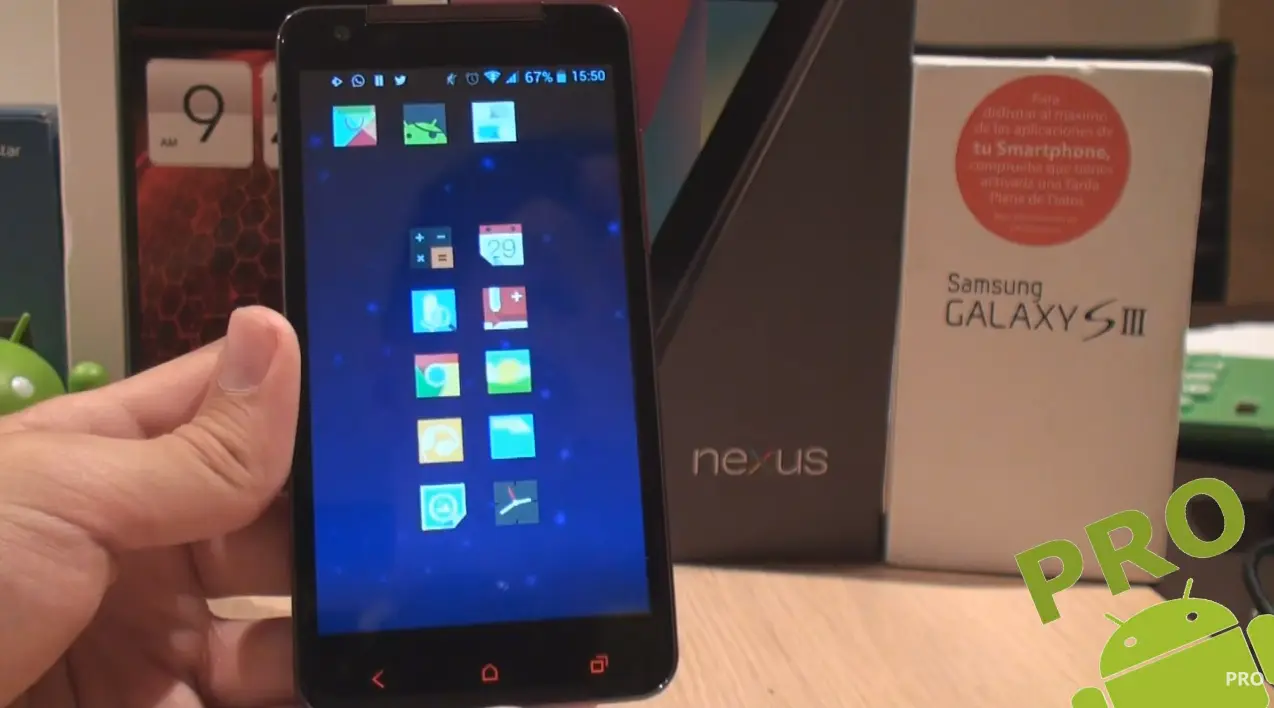
A screen grab from one of the many videos I used to watch circa 2014. By <a href='https://www.youtube.com/watch?v=3zHi2KOG0FE'>Pro Android</a>
A screen grab from one of the many videos I used to watch circa 2014. By Pro Android

QuickPic

Before Simple Gallery, QuickPic was the top of the game, the simplest, lightest, fastest gallery app there was. To this day it remains one of the saddest downfalls when it comes to how good it used to be, before being acquired by Cheetah Mobile.

As soon as the acquisition took place, some mods made out of the last non-CM version have been released and the original APK still floats around in the Web. It still kind of rocks, its animations look great, and it is lighter than Simple Gallery, so maybe it’s still worth a shot for some, I decided to try the mod for a while.

SwipeBack

This is the precursor to today’s navigation gestures, this was the ultimate way to go back in an app, even more functional than today. Back in the day there were a couple other apps like this. I also remember Navigation Layer, which I never got to use. SwipeBack would display an awesome animation that showed what was “behind” the current screen. It ended up dying for a while during the 4.0 days, but got resurrected with support up to Lollipop. It has been dead for a while, and it took until Android 13 for stuff like Predictive Bar Gestures to show up, even if they are still work in progress. I absolutely loved using this Magisk Module.

Gravity Box

I was so happy when I finally got to try this module back in the day. The amount of tweaks this Xposed module provided was unmatched, probably the second-best one was XuiMod, which provided many awesome scrolling animations when opening apps, pop-ups or scrolling through lists. These things were super fancy and cool. Later one some Custom ROMs would begin adding these tweaks to the built-in settings, and eventually it stopped receiving support, at least for now, since the last Android version that it worked with was 11.

Dolphin Browser

Back then pretty much all browsers sucked, except for this one. Later on, CM Browser was also pretty good (until Cheetah Mobile showed its true colors, of course). This app was light, fast and pretty customizable for its time. Reviews of it convinced me to try it out back then, and honestly, I wish browsers today were as good. Today we have DuckDuckGo, SmartCookieWeb or Via Browser, and while the quickness is there, they are just not as fun. There were gestures shortcuts, tabs and all sorts of cool little things that still didn’t slow down the device at all. I don’t understand how apps today are so heavy when stuff like this existed back then, but maybe it used the built-in WebView engine like many light browsers today. The app is still around, but it’s nowhere near as good as before. If I were to guess, its probably a security and privacy nightmare.

Finishing thoughts

The list goes on. I guess this could be a bit of a semiregular series, there are still quite a bunch of apps from back then that aren’t needed or no longer work nowadays.

I have to admit, I feel like there are a lot missing, seriously I almost don’t want to post this one as is. But I already spent a while writing here,so it will have to do.

Anyway, I just wanted to share what used to be some of my favorite tools I used back in the day, such fun times. What are the apps you used that were awesome but ended up dying or retired from the Play Store? Please share your own list!

This is day 39 of #100DaysToOffload

]]>
joelchronome@joelchrono.xyz
FOSS Android apps I like2022-07-05T15:59:50-05:002022-07-05T15:59:50-05:00https://joelchrono.xyz/blog/foss-android-apps-i-likeAs an added bonus, all the apps in this list have an icon available on the Arcticons icon pack, most probably made by me B). Other than that, the description pretty much says it all so I’ll just start with the list.

PolyCal

PolyCal is a calendar widget that does exactly what I want, its just a compact list of events, with the important information laid out in a really minimal way. It does not have a lot of settings, but you can adjust the date format and some other things.

It integrates well with Simple Calendar and most others, since it requires Calendar access and all that. You can even select only certain calendars to show up, which adds a nice bit of privacy.

Super Retro Mega Wars

Just look at that title! if that wasn’t enough to try it out, I don’t know what will. This is a great collection of retro games that can be played solo and even online with your friends. It’s also made with Godot, an open source game engine that I’ve used in the past. it has a great aesthetic and the controls are great, so if you find yourself bored you should give it a go.

URL Radio

This is quite a recent discovery for me. The app just does what it says, you can add a URL from some web radio and play it no problem, what I like about it is that you don’t even have to know the URL of anything, it comes with quite a big list of stations you can just add and forget. I personally found some nice Lo-fi and Videogame music stations that I didn’t even know I needed in my life.

There are no subscriptions and no need to get a local music collection, just choose a station that fits your mood and be free.

Buran

This is a really nice Gemini client (remember when that was all the rage?). It works great for the few sites I follow with it. I really enjoy using it, even if its not so common when it happens. I started a Gemini capsule along this website back then, but it has been a second class citizen and it barely functions properly, but you can visit it if you feel like it

Openreads

If you are a reader like me you are probably aware of Goodreads, a website that lets you keep track of books you read. If you are a Fediverse advocate like me, you probably know about Bookwyrm, the alternative to it.

Openreads is, sadly, not a Bookwyrm client, but it allows you to keep track of the books you’ve read locally on your device. It also has a great UI and smoothness. It would be great if it could sync with Bookwyrm, skipping on the social aspect, like how Tachiyomi syncs progress with MAL or Anilist.

That’s it

So yeah I just wanted to share some apps that I thought deserved a bit more recognition, they are not in any particular order but this is the end of the post so it doesn’t really matter what I say now.

Anyways, let me know if you would like me to do this again with some other apps or maybe some Linux programs too. Until later.

]]>
joelchronome@joelchrono.xyz
Switching to K-9 Mail, a FOSS email client2021-05-14T20:29:18-05:002021-05-14T20:29:18-05:00https://joelchrono.xyz/blog/k9-mail-appAs mentioned in previous blogs, I recently switched my android rom and factory reset my device. In the process of doing so, my email app of choice broke, that app is Spark Email, a proprietary app that I simply liked because of its pretty UI and ease of use. Despite that, I was felling a bit ashamed of using it, because, well, it’s not FOSS.

I am quite a FOSS advocate, but I am also a bit pragmatic. I still use Google services often, a lot more than I would like to admit. So if I was already using them, why wouldnt I give away more of my freedom for the sake of convenience, right?

Yeah, that’s the train of thought I have sometimes. But other times, like today, I am feeling a more privacy conscious, and I decided to look for an alternative email client. I had already tried Fairemail a fairly decent app that works wonderfully. However, it contains unobtrusive, privacy friendly ads, which are not bad at all and are completely understandable, but I didn’t want to deal with them, besides, I had already tried it, and I wanted something new.

And here is where K-9 Mail comes to the rescue. The app was a bit dead, but last year, the app got a visual redesign that caught my attention and convinced me to give it a chance. I knew about the app for years, but just by looking at its icon and the screenshots showcased on F-Droid, I never installed it.

K-9 Mail's website, its actually better looking than Fairemail's

Setting up my accounts

I was pleasantly surprised, setting up my Gmail account was as simple as Google lets you, using the so called “App Passwords” needed for anything that doesn’t wanna use their login authentication methods.

Adding the rest of my accounts was a piece of cake, I had to add my school account with IMAP because the domain was weird and unable to be automatically setup like my personal one, however, it was no big deal.

A Microsoft account I got had no trouble at all, although I should add 2FA to it, since it’s not active.

The User experience

K-9 Mail pretty much looks like the Gmail app before they changed to Material Design 2.0 a couple years ago. And that’s a good thing for me. It has a bit of similarity to Fairemail, but I liked K-9 a bit more since its more simplistic and a bit less cluttered. Besides, the starting screen of Fairemail its their settings, and its really overwhelming, which was a reason I wanted to avoid K-9, since I thought it would be even worse. But I am quite happy with how it is.

There is a really good Dark Theme, a nice amount of settings and customization and it even applies a dark mode to the email contents, which is good for those nasty non-plain text emails that have their own styling.

K-9 with Dark theme enabled, looking good!

Overall

It is a pretty great experience! so nice and comfy I did a whole blog about it. Like, I can’t believe I spent so many years not using this (being fair, it looked terrible 2 years ago, but still).

The only thing I disliked for a bit was the non-instant arrival of emails, which is normal for most email clients that once again don’t depend on Google immediately. I wonder if there is some way to trigger the update, but at the same time, I don’t really need email to be instant.

With this setup, I am very happy again with my FOSS mindset. It has reinspired me to check out even more alternative, free software applications. This is day 36 of #100DaystoOffload

]]>
joelchronome@joelchrono.xyz
MauiKit apps, school exams, switching rom2021-05-11T18:01:34-05:002021-05-11T18:01:34-05:00https://joelchrono.xyz/blog/exam-android-apps-romTrying apps built MauiKit

So, I was watching Distrotube’s latest video, where he talks about Nitrux, a pretty new distro, that has some really interesting concepts, one of which caught my attention inmediately.

Nitrux uses some really unique programs as default, Index, their file manager, Nota (notes), Station (terminal), Vvave (music player) and others,which are built with a framework named MauiKit. This tool is similar to GTK or Qt, but it seems to be quite faster to work with, but I am not expert. But I found out that they have android versions for some of their applications, and I decided to give them a try just for fun.

I was really weirded out by these apps, they look so different from the apps following the Material Design used by Android. They are not available on F-Droid nor Google Play. I was only able to find them in some KDE’s random repo.

The apps are still quite broken sometimes, the music app was unable to detect most of the album art on my songs, and for some reason was unable to display “Daft Punk” correctly (only showed “Da”).

There were some nice transitions and animations. But simple stuff, like hitting play and pause, invoking the weird bottom hamburger menu, or switching directories looked pretty plain. However, I am not going to complain, I have never heard of these apps before, so I think that they are still quite new, and I hope they improve and get noticed a lot more in the future. Its nice to see more alternatives to the default applications, I have always enjoyed to test them out.

Utterly failing an exam, at least everyone else did too!

Today I got an exam to complete. I was getting ready for it for days. And I was quite confident on being able to figure it out. However, right after I opened the file containing the questions, I realized it wouldnt be as easy as I thought.

The first 5 questions where problems that required using Inverse Laplace transforms and using the partial fractions method to solve differential equations. This might sound complicated to some, but it really isn’t that hard. However, it takes a lot of time to solve the problems. And while I understood the concepts and studied them, I didn’t actually solved any proper problems myself, and I got stuck for a while solving some basic things. I ended up taking an hour to solve the first 2 problems.

Thankfully, the last three were easier now that I found myself in the flow state. The problems were more complex, but it took me less time to solve them. The problem was. By the end I still had 5 more problems to solve. These problems were about Block Diagram reduction. Which is a technique used for the design of Controllers, System Dynamics and stuff like that.

Once again, I found myself in trouble, I had to show every step of the reduction process, and I would lose more time drawing the diagrams rather than actually solving them.

With 15 minutes left, I managed to solve the easiest of the bunch, after drawing and solving the couple steps to get the Transfer function. The time left was spent taking the pictures with a Doc Scanner app (I am looking for some FOSS alternative, but I use Notebloc because its the lightest of the bunch, and doesn’t seem to have any controversial things, like Cam Scanner and such).

Backing up apps and changing my rom once again

So, I have already done a similar blog talking about this topic, so check it out if you want to read a bit more about the topic. I said it before, and here I am again. I love android’s customization. ArrowOS, my previous rom, was alright, it was simple and minimal, pretty customizable, but it still lacked a few things I wanted.

First impressions

I am now on crDroid. And just by checking its Recents screen, I noticed it comes already with a pretty distinct style to stock android. It reminds me of Resurrection Remix, which I had used before, but has not been updated in a while. So that’s great for me, since I got the CRT effect back for my screen off animation!

Syncthing, details and annoyances

After restoring my Migrate backup, reinstalling Magisk Manager and rebooting, I was ready to go. The default look and feel, as well as the wallpaper were beautiful, some apps were glitchy so I had to reinstall them. But that’s not the rom’s fault.

Syncthing, the backup program I use, doesn’t play nice when the folders that used to exist no longer do, but after resharing my folders from my computer, everything worked great, I was once again surprised at how quick the syncing process is, and wondered once again why this tool is not used by absolutely everyone.

Ending the day

So yeah, I have everything back on track. No real problems for me, since I am quite used to dealing with everything I had. School was a bit tiresome, but nothing too difficult really, I believe the teacher is going to be understanding of the situation, since most classmates also lacked enough time to finish.

There was one person, who actually did it all and got a 10/10. I would have been surprised if it wasn’t for the fact that some friends realized that ~3 of the problems were already solved from previous classes. In the end I got 5.5 out of the 6 questions I solved, its not ideal, but I also got some encouragement from my teacher, assuring me that I could have had a better score if I had more time, so I felt better, and I hope justice is made.

In the end, Android lives on, school moves on and I forgot to backup the MauiKit apps, I hope they improve and get published in a F-Droid or something!

This is day 35 of #100DaystoOffload

]]>
joelchronome@joelchrono.xyz
Listening Podcasts on Antennapod2021-02-17T13:09:00-06:002021-02-17T13:09:00-06:00https://joelchrono.xyz/blog/antenna-podcastsAround 2 years ago, I started to get interested in podcasts, due to the release of Google Podcasts (interestingly enough). I had heard about them, and I was starting to get into programming, so I decided to try the app and look up for some podcasts that talked about those kind of themes.

Honestly, after a few days I just forgot about it and uninstalled the app, but thats how I got interested in them (Thanks Google).

Months later, I tried AntennaPod, a free and open source app that allowed me to do the same thing, and I liked it a lot, it just had quite an ugly interface, but I was willing to give it a try.

They recently got a very nice redesign that gets rid of the Holo interface for something based on current Material design guidelines (still a bit rough around the edges, as most FOSS projects). And I have been listening to more podcasts lately, so I wanted to share this app because it is quite fantastic.

I keep a backup of the full database thanks to Syncthing, similarly of how I manage my RSS feeds. but it allows to export to simple OPML files too, but I like the stats it gives me, so saving them for everytime I reboot my phone is quite nice.

Some podcasts suggestions. 📻

I have a lot of subbed podcasts that I listen from time to time, but these are a few that I consistently listen to, or that are finished shows that I enjoyed.

  • Wolf 359: A broadcast from space, full of humor at first, maybe a bit too relaxed at the beginning, but the mystery builds up quite nicely, listened to it last year, really worth it if you like sci-fi and pop references.
  • Phoebe Reads a Mystery: I listen to this sometimes before sleeping, quite a relaxing voice, and the novels available at the moment are great, right now I am listening to 20000 Leagues Under the Sea, which Ive read before but in Spanish.
  • Darknet Diaries: Hackers, viruses and cyber-security stuff, quite entertaining to listen to if you like that kind of stuff, not too technical.
  • The Great Detectives of Old Time Radio: I also like to listen to this before going to sleep, these are recordings from radio shows from the 1940s, sometimes the music is a bit loud (listen to the intro and you will get it), but I really like them.
  • Archive 81: The contents of tapes from an old archive, which contains some pretty weird stuff. Currently listening to this one, the first season is great, I listened to all of it in a single day, I am currently going through the second one which has longer episodes.
  • Welcome to Night Vale: The radio from a weird town, very mysterious but kinda fun. It’s very easy to binge listen.
  • Destination Linux: Linux news and FOSS news, But I usually watch it on its video format.
  • Crime Junkie: I listen to this one from time to time, but not a lot lately. The first episode I listened of it was too good though.
  • The Bright Sessions: A psychologist who treats special people who have powers, a bit too dramatical for me sometimes, and I am a bit stuck due to lack of time. But pretty good.

Finishing up

There is another FOSS podcasts app that I quite like, named Tsacdop, this one is not developed by a whole community like Antennapod, so it is still quite in its early stages, but you can still try it out, since it has a very unique feel to it, I really love its layout.

Anways, Antennapod is a very good app, they also have their own forums where you can leave suggestions and bug reports, and contribute in any way you want. It is still quite active in development, and is one of those FOSS apps that can have a fair fight against their non-free (as in freedom) competitors, such as Podcast Addict and others (Google Podcasts is not even close by the way).

If you have any other podcasts that I should listen to, please let me know, this has been day 13 of #100DaystoOffload

]]>
joelchronome@joelchrono.xyz
This XML file does not appear to have any style information associated with it. The document tree is shown below.
<feed xmlns="http://www.w3.org/2005/Atom">
<generator uri="https://jekyllrb.com/" version="4.4.1">Jekyll</generator>
<link href="https://joelchrono.xyz/feeds/apps.xml" rel="self" type="application/atom+xml"/>
<link href="https://joelchrono.xyz/" rel="alternate" type="text/html"/>
<updated>2025-11-11T22:50:27-06:00</updated>
<id>https://joelchrono.xyz/feeds/apps.xml</id>
<title type="html">joelchrono’s blog</title>
<author>
<name>joelchrono</name>
<email>me@joelchrono.xyz</email>
</author>
<entry>
<title type="html">What’s on my Phone (Summer 2025)</title>
<link href="https://joelchrono.xyz/blog/whats-on-my-phone-summer-2025/" rel="alternate" type="text/html" title="What’s on my Phone (Summer 2025)"/>
<published>2025-07-09T22:15:00-06:00</published>
<updated>2025-07-09T22:15:00-06:00</updated>
<id>https://joelchrono.xyz/blog/how-i-setup-my-new-phone</id>
<content type="html" xml:base="https://joelchrono.xyz/blog/whats-on-my-phone-summer-2025/">
<![CDATA[ <p>I don’t know what it is, but I really enjoy having a new phone to configure. I recently acquired the Nothing Phone 3(a) to replace my <a href="/blog/2025-w27/#new-phone-who-dis">broken Xiaomi Mi12T Pro</a>, and it’s been awesome.</p> <p>As soon as I turned it on, I knew it would be quite a treat to my eyes. The clean android experience that NothingOS has to offer is something I was missing since I had to switch to Xiaomi’s HyperOS because of my <a href="/blog/my-phone-scared-me-(again)/">Poco F4 failing on me</a></p> <p>Every time, it feels like a challenge, but one of the cool ones, where I try to stay as minimal as possible, installing as few apps as I can, logging it to the essential accounts only.</p> <p>That threshold grows every time though, becoming a bit of a behemot, as I have to install a banking app, or as I log into another email address. But I still try, I slowly realize what programs I use less, and which ones I don’t really care about that much. I delete accounts for some videogame or some random service I no longer use. And at the same time, I add a new more grown-up account, for whatever alternative shopping website I choose to try instead of Amazon or the big online shops in my country.</p> <p>So, setting up my phone and what’s on it went more or less like this:</p> <ul> <li>Do the basic Android setup, don’t login to anything and say no to tracking and such</li> <li>Go to Settings, developer options, set animation speed to 0.5</li> <li>Enable 3-button naviation</li> <li>Go to Chrome (the Android default, unfortunately), look up <a href="">Droid-ify</a> and install</li> <li>Via Droid-ify, install: <ul> <li>KeepassXC for password management</li> <li>Syncthing-Fork to sync files between devices</li> <li>Fennec to browser the web</li> <li>Gramophone for local music</li> <li>Metrolist for YT Music</li> <li>Tubular for YouTube</li> <li>Otraku for Anilist</li> <li>Fossify Gallery, Contacts and Calendar</li> <li>Stealth for Reddit</li> <li>Binary Eyes for barcodes</li> <li>Conversations for XMPP</li> <li>Sunup for Unified Push Notifications</li> <li>Markor for Markdown files</li> <li>Material Files for file management</li> <li>Nextcloud for file storage and DAV sync</li> <li>DAVx5 to sync contacts and calendar events from Nextcloud</li> <li>OpenKeyChain to import my keys, and configure K-9 Mail encryption</li> <li>Tusky for the Fediverse</li> <li>Arcticons because line-based icons rule.</li> <li>KISS Launcher is best</li> </ul> </li> <li>Set Arcticons as the system-wide icon pack (NothingOS lets me do that!)</li> <li>Setup KISS Launcher as default by importing the configuration (a json string, super portable!) on my new phone</li> <li>Setup Syncthing and sync my “Backups” folder, which contains my Keepass database, and backups for AntennaPod, Tubular, Threema, K-9 Mail, among other apps</li> <li>Sync other folders via the same method, for pictures, music, etc.</li> <li>Restore app backups where possible.</li> <li>Via Fennec, download and install some apps: <ul> <li>ActivityWatch for app usage tracking</li> <li>Mihon to read manga</li> <li>Aniyomi to watch anime</li> <li>SimpleScrobbler to scrobble to Listenbrainz</li> </ul> </li> <li>Login to certain websites such as Backloggd, Letterboxd, Bookrastinating, Anilist, GitHub, etc</li> <li>Set up an empty Google account because I need Play Store nowadays</li> <li>Disable sync, and as many things as possible</li> <li>Via Play Store, install: <ul> <li>Banking apps because I’m an adult now</li> <li>Signal and WhatsApp, migrating data from previous phone or backup</li> <li>Steam because of Steam Guard</li> <li>Proton Mail which I use for some things</li> <li>YouVersion Bible because it’s the only one with all the versions I use</li> <li>Snapseed because it’s still the best photo editor</li> <li>Shopping apps because I am irresponsible</li> <li>Nintendo Parental Controls to track my Nintendo Switch usage</li> <li>Brawl Stars, the only online game remaining</li> <li>Discord, because communities there are nice sometimes</li> </ul> </li> <li>Delete or disable bloat, in this case it was already minimal, thankfully</li> </ul> <p>And everything is pretty much done!</p> <h2 id="related-posts">Related posts</h2> <p>I’ve written a couple posts in the past about similar things, in case you want to check them out after this! (Or check the <a href="/more/tags/android">android</a> tag)</p> <ul> <li><a href="/blog/what-is-on-my-phone-fall-2023/">What’s on my Phone (Fall 2023)</a> - A much more in-depth look at the apps on my phone back then, I wasn’t feeling like going as hard for this post, so you can take a look at this one if you want more.</li> <li><a href="/blog/new-phone-experience/">New Phone Experience</a> - My initial experience using my Poco F4, the phone I had before the 12T Pro, and that I actually rather liked!</li> <li><a href="/blog/my-home-screen-2024/">My Home Screen (2024)</a> - A pretty in-depth look at everything in my homescreen. Including app shortcuts via gestures, invisible folders and the like, using Nova Launcher at the time.</li> <li><a href="/blog/default-apps-2025/">Default Apps (2025)</a> - Another list, including both desktop and mobile programs that I use by default.</li> </ul> <p>This is day 95 of <a href="https://100daystooffload.com">#100DaysToOffload</a></p> ]]>
</content>
<author>
<name>joelchrono</name>
<email>me@joelchrono.xyz</email>
</author>
<category term="android"/>
<category term="software"/>
<category term="apps"/>
<summary type="html">
<![CDATA[ Everything on my new phone, the Nothing 3(a), and all the basic steps I took when I set it up. ]]>
</summary>
</entry>
<entry>
<title type="html">Default Apps (2025)</title>
<link href="https://joelchrono.xyz/blog/default-apps-2025/" rel="alternate" type="text/html" title="Default Apps (2025)"/>
<published>2025-04-25T07:40:00-06:00</published>
<updated>2025-04-25T07:40:00-06:00</updated>
<id>https://joelchrono.xyz/blog/default-apps</id>
<content type="html" xml:base="https://joelchrono.xyz/blog/default-apps-2025/">
<![CDATA[ <p>It’s been a couple of years since I’ve updated my <a href="https://defaults.rknight.me">default apps list</a>, so I thought I may as well do it. My previous list is <a href="/blog/default-apps-2023">still available</a> if you want to check it out as well! See my <a href="/uses">uses page</a> for more.</p> <p>One of the notable changes is the lack of any Nextcloud services. My Raspberry Pi is still not online, and I haven’t really missed it that much. Most of my file management is now done on my computer with local files, and I sync stuff with Syncthing to my phone.</p> <p>Other changes would be browsers, the removal of Simple Apps in favor on the Fossify forks, and a couple new sections I saw some people add, like blogging and social media.</p> <p>Here we go:</p> <ul> <li>📮 <strong>Mail Server</strong>: Disroot.org, Proton.me</li> <li>📨 <strong>Mail Client</strong>: Thunderbird, K-9 Mail</li> <li>📝 <strong>Notes</strong>: Joplin, Signal (Note to Self)</li> <li>✅ <strong>To-Do</strong>: Signal (Note to Self)</li> <li>📱 <strong>Launcher</strong>: KISS Launcher, Rofi</li> <li>📷 <strong>Photo Shooting</strong>: Google Camera</li> <li>🟦 <strong>Photos Management</strong>: Fossify Gallery</li> <li>📆 <strong>Calendar</strong>: Fossify Calendar</li> <li>📅 <strong>Calendar Backend</strong>: Local-only</li> <li>📁 <strong>Cloud File Storage</strong>: Syncthing</li> <li>📖 <strong>RSS</strong>: FreshRSS, Newsboat, Capy Reader</li> <li>🙍🏻‍♂️ <strong>Contacts Management</strong>: Fossify Contacts</li> <li>🔎 <strong>Browser</strong>: Zen Browser, Fennec</li> <li>💬 <strong>Chat</strong>: Signal, WhatsApp, Threema, Discord</li> <li>🔖 <strong>Bookmarks</strong>: Zen Browser</li> <li>📑 <strong>Reading</strong>: Mihon, KOReader</li> <li>📚 <strong>Book tracking</strong>: Bookwrym, The Storygraph, This site</li> <li>🍿 <strong>Media Tracking</strong>: Letterboxd, Backloggd</li> <li>📜 <strong>Word Processing</strong>: Neovim, Markdown</li> <li>📈 <strong>Spreadsheets</strong>: Google Sheets</li> <li>📊 <strong>Presentations</strong>: Google Slides</li> <li>📰 <strong>News</strong>: FreshRSS, The Verge, 404 Media, etc.</li> <li>🎵 <strong>Music</strong>: YT Music, RiMusic, BlackPlayer</li> <li>🎼 <strong>Music scrobbler</strong>: Listenbrainz, Simple Scrobbler</li> <li>🎤 <strong>Podcasts</strong>: AntennaPod</li> <li>🔐 <strong>Password Management</strong>: KeepassXC, KeepassDX, Aegis OTP</li> <li>👨‍👩‍👧‍👦 <strong>Social Media</strong>: Fosstodon, Polymaths Social</li> <li>🔍 <strong>Search Engine</strong>: DuckDuckGo</li> <li>📝 <strong>Blogging</strong>: Jekyll, Vercel</li> </ul> <p>What are yours?</p> <h3 id="changelog">Changelog</h3> <div class="language-plaintext highlighter-rouge"><div class="highlight"><pre class="highlight"><code>- New sections: Social Media, Blogging, etc - Added Neovim - Replaced FeedMe with Capy Reader - Replaced Tachiyomi with Mihon - Replaced Firefox/Mulch with Zen Browser/Fennec - Replaced Spotify with YT Music. - Replaced Simple Apps (calendar, gallery) with Fossify forks - Replaced Mi Cam with Google Camera (modded apk) - Removed Tasks.org - Removed Shotwell - Removed Khal - Removed MEGA - Removed Nextcloud from most defaults. - Removed sections: Shopping List, Meal Planning, Budgeting </code></pre></div></div> <p>This is post 56 of <a href="https://100daystooffload.com">#100DaysToOffload</a></p> ]]>
</content>
<author>
<name>joelchrono</name>
<email>me@joelchrono.xyz</email>
</author>
<category term="community"/>
<category term="apps"/>
<category term="software"/>
<category term="challenge"/>
<summary type="html">
<![CDATA[ Just an update to the apps I currently have set as the default on my laptop and my phone! ]]>
</summary>
</entry>
<entry>
<title type="html">Default Apps (2023)</title>
<link href="https://joelchrono.xyz/blog/default-apps-2023/" rel="alternate" type="text/html" title="Default Apps (2023)"/>
<published>2023-11-07T20:51:41-06:00</published>
<updated>2023-11-07T20:51:41-06:00</updated>
<id>https://joelchrono.xyz/blog/default-apps-2023</id>
<content type="html" xml:base="https://joelchrono.xyz/blog/default-apps-2023/">
<![CDATA[ <p>This was inspired by <a href="https://0xdstn.site/thoughts/default-apps-2023/">a post</a> by <a href="https://mastodon.spotek.io/@dustin">@dustin</a>, who was also inspired by others, who were inspired by Episode 97 of the <a href="https://defaults.rknight.me/">Hemispheric Views podcast</a>, which I literally listened to while typing this. For now, here we go:</p> <p>Here we go,</p> <ul> <li>📮 <strong>Mail Server</strong>: Disroot.org, Proton.me</li> <li>📨 <strong>Mail Client</strong>: Thunderbird, K-9 Mail</li> <li>📝 <strong>Notes</strong>: Joplin, Signal (Note to Self)</li> <li>✅ <strong>To-Do</strong>: Signal (Note to Self), Tasks.org</li> <li>📷 <strong>Photo Shooting</strong>: Mi Cam (Xiaomi)</li> <li>🟦 <strong>Photos Management</strong>: Simple Gallery, Shotwell</li> <li>📆 <strong>Calendar</strong>: Simple Calendar, Khal</li> <li>📅 <strong>Calendar Backend</strong>: Nextcloud</li> <li>📁 <strong>Cloud File Storage</strong>: Syncthing, Nextcloud, MEGA</li> <li>📖 <strong>RSS</strong>: Newsboat, FeedMe, backed by FreshRSS</li> <li>🙍🏻‍♂️ <strong>Contacts Management</strong>: Simple Contacts, Khard, backed by Nextcloud</li> <li>🔎 <strong>Browser</strong>: Firefox, Mulch</li> <li>💬 <strong>Chat</strong>: Signal, WhatsApp, Threema, Discord</li> <li>🔖 <strong>Bookmarks</strong>: Firefox</li> <li>📑 <strong>Reading</strong>: Librera Reader, Tachiyomi</li> <li>📜 <strong>Word Processing</strong>: Markdown + Pandoc</li> <li>📈 <strong>Spreadsheets</strong>: Google Sheets</li> <li>📊 <strong>Presentations</strong>: Google Slides</li> <li>🛒 <strong>Shopping List</strong>: Signal (Send to Self)</li> <li>🍴 <strong>Meal Planning</strong> ( as Recipe Management): N/A</li> <li>💰 <strong>Budgeting and finance</strong>: N/A</li> <li>📰 <strong>News</strong>: The Verge, 9to5 Linux, Reddit, backed by FreshRSS</li> <li>🎵 <strong>Music</strong>: Spotify</li> <li>🎤 <strong>Podcasts</strong>: AntennaPod</li> <li>🔐 <strong>Password Management</strong>: KeepassXC, KeepassDX, Aegis OTP</li> </ul> <p>What are yours?</p> <p>This is post 79 of <a href="https://100daystooffload.com">#100DaysToOffload</a></p> ]]>
</content>
<author>
<name>joelchrono</name>
<email>me@joelchrono.xyz</email>
</author>
<category term="community"/>
<category term="apps"/>
<category term="software"/>
<summary type="html">
<![CDATA[ Doing what's trendy and talking about the default apps on my phone and desktop ]]>
</summary>
</entry>
<entry>
<title type="html">Still using Gboard</title>
<link href="https://joelchrono.xyz/blog/still-using-gboard/" rel="alternate" type="text/html" title="Still using Gboard"/>
<published>2023-10-10T10:30:00-06:00</published>
<updated>2023-10-10T10:30:00-06:00</updated>
<id>https://joelchrono.xyz/blog/still-using-gboard</id>
<content type="html" xml:base="https://joelchrono.xyz/blog/still-using-gboard/">
<![CDATA[ <p>Yesterday’s post was written on my phone, and that’s the case today. It honestly doesn’t take that much time to do it here compared to my laptop, because what limits my typing speed is not how fast I type, but how much time I spend thinking on what to write next.</p> <p>This makes it so typing on a phone is not so bad of an experience, but the other factor is GBoard.</p> <p>As a FOSS enthusiast, I tend to favor using FOSS apps on my phone. The reality is that quite a bunch of the alternative keyboards simply aren’t good enough, it wasn’t always that way though…</p> <h1 id="my-story-with-phone-keyboards">My story with phone keyboards</h1> <p>I’ll skip the T9 keyboards and the non-android phones, <a href="/blog/the-smartphones-i've-owned-so-far">I already wrote about the phones I’ve had</a>. All I remember is that at some point I tried predictive T9 and it was so fast it was amazing, but those times are long gone now.</p> <p>In the beginning, the weird Chinese phone I had was the worst thing ever, it wasn’t a modern touch screen, I could push too hard and it would leave a mark, it also had no multi-touch functionality at all. I just used the default keyboard because the thing only had like 512 MB of storage.</p> <p>The HTC Status had a pretty decent physical keyboard, it was not bad, but the keys were kinda mushy and it was getting worse over time. Regardless, it was pretty nifty and I was able to program all the keys on a GBA emulator and play games like that. It kinda sucked but I did it anyways, and for a turn based rpg like Pokemon, it didn’t matter how responsive those things were.</p> <p>From there I got a Galaxy S3 mini, handed down by my dad. This phone was where I explored a bunch of different keyboard options all the time. The thing was rooted and modded to oblivion, it actually died because of that. Back then, my favorite keyboard was <a href="https://fleksy.com">Fleksy</a>, the ability to hide the space bar and use just gestures to move around was fantastic because of the small screen factor and the responsiveness of it all.</p> <p>Sadly, later updates have made some random changes that I am not a fan of, they started trying to implement swipe typing (like most keyboards) instead of improving their existing gesture method, and it kinda broke it all.</p> <p>After Fleksy, I became a huge fan of Openboard, it had some of the nice gestures of Gboard without all the fuss, it worked wonderfully and I didn’t have a need for much else for quite a while. However, something started to change…</p> <h1 id="switching-to-gboard">Switching to GBoard</h1> <p>I started to write in English more. After I started to interact on more diverse places like Discord and eventually Mastodon, I had the need to switch between keyboard languages, and Openboard or Fleksy just didn’t cut it anymore, nothing did.</p> <p>That’s when GBoard won. Swiftkey was a contender and I’ve tried it multiple times, for months, but I just love the features and the smoothness GBoard brings. The Material You theming, the predictions and suggestions, and of course the fact that I don’t need to set my keyboard in a language or another, it will just work as I expect it to do so.</p> <p>I would love to tell you I have it all locked down and without internet access, but honestly I just install it and don’t think much about that. It respects the privacy mode while filling password fields or using certain apps and the word suggestions just get better and better. The clipboard feature is also pretty good, as well as the built-in translator. So far it’s been a few years old things working just fine…</p> <p>I still keep an eye on the FOSS alternatives, but it is how it is. 🤷‍♂️</p> <p>This is post 70 of <a href="https://100daystooffload.com">#100DaysToOffload</a>. Have a good rest of your day, fellow reader. 😊</p> ]]>
</content>
<author>
<name>joelchrono</name>
<email>me@joelchrono.xyz</email>
</author>
<category term="android"/>
<category term="productivity"/>
<category term="apps"/>
<summary type="html">
<![CDATA[ A brief history of the different keyboards I've tried on my phone, and how I ended up using GBoard despite it all. ]]>
</summary>
</entry>
<entry>
<title type="html">Android Apps of the Future Past</title>
<link href="https://joelchrono.xyz/blog/android-apps-of-the-future-past/" rel="alternate" type="text/html" title="Android Apps of the Future Past"/>
<published>2023-02-16T23:17:00-06:00</published>
<updated>2023-02-16T23:17:00-06:00</updated>
<id>https://joelchrono.xyz/blog/android-apps-of-the-future-past</id>
<content type="html" xml:base="https://joelchrono.xyz/blog/android-apps-of-the-future-past/">
<![CDATA[ <p>Back in the day Android was a lot of fun. There were a lot of apps, super unique and quite powerful, usually shared on the XDA forums and the like. There was XPosed in all of its glory, there were a lot of rooting methods for different devices, and finally a few years later, there was Magisk. It was a bit of a wild west, and sadly, I only got to live the last couple of years of this golde age of great apps and modules that were awesome and fun.</p> <h1 id="the-list">The list</h1> <p>These are only a few of the tons of apps I used to try back then, most of this list was inspired by watching a lot of videos by the Spanish YouTube channel <a href="https://www.youtube.com/@Proandroid">Pro Android</a> that showcased some of the best app recommendations I’ve ever seen, even compared to similar channels today. I still go back to his old catalog and find a few great apps still working from time to time.</p> <blockquote> <p>Quick Tip: YouTube <strong>removed sorting by oldest</strong> months ago in the web UI, you can however, use the search feature inside a Youtube channel and search for “before:20XX” as well as whatever term you want, and it will show videos from before that year. It is how it is, at least it works!</p> </blockquote> <figure class="img"> <picture> <source srcset="/assets/img/blogs/2023-02-16-old-phone-apps.webp" type="image/webp" /> <source srcset="/assets/img/blogs/2023-02-16-old-phone-apps.webp" /> <img class="mx-auto" src="/assets/img/blogs/2023-02-16-old-phone-apps.webp" alt="A screen grab from one of the many videos I used to watch circa 2014. By &lt;a href='https://www.youtube.com/watch?v=3zHi2KOG0FE'&gt;Pro Android&lt;/a&gt;" /> </picture> <figcaption class="caption">A screen grab from one of the many videos I used to watch circa 2014. By <a href="https://www.youtube.com/watch?v=3zHi2KOG0FE">Pro Android</a></figcaption></figure> <h2 id="quickpic">QuickPic</h2> <p>Before Simple Gallery, QuickPic was the top of the game, the simplest, lightest, fastest gallery app there was. To this day it remains one of the saddest downfalls when it comes to how good it used to be, before being <a href="https://www.androidpolice.com/2015/08/29/popular-photo-gallery-app-quickpic-has-been-bought-by-cheetah-mobile-and-users-are-pissed/">acquired by Cheetah Mobile</a>.</p> <p>As soon as the acquisition took place, some mods made out of the last non-CM version <a href="https://forum.xda-developers.com/t/mod-app-gallery-quickpic-2022.3790425/">have been released</a> and the original APK still floats around in the Web. It still kind of rocks, its animations look great, and it is lighter than Simple Gallery, so maybe it’s still worth a shot for some, I decided to try the mod for a while.</p> <h2 id="swipeback">SwipeBack</h2> <p>This is the precursor to today’s navigation gestures, this was the ultimate way to go back in an app, even more functional than today. Back in the day there were a couple other apps like this. I also remember <strong>Navigation Layer</strong>, which I never got to use. SwipeBack would display an awesome animation that showed what was “behind” the current screen. It ended up dying for a while during the 4.0 days, but <a href="https://forum.xda-developers.com/t/xposed-app-ics-lp-swipeback2-finally-back-alive.3068694/">got resurrected</a> with support up to Lollipop. It has been dead for a while, and it took until Android 13 for stuff like <a href="https://www.xda-developers.com/android-14-predictive-back-gesture/">Predictive Bar Gestures</a> to show up, even if they are still work in progress. I absolutely loved using this Magisk Module.</p> <h2 id="gravity-box">Gravity Box</h2> <p>I was so happy when I finally got to try this module back in the day. The amount of tweaks this Xposed module provided was unmatched, probably the second-best one was <strong>XuiMod</strong>, which provided many awesome scrolling animations when opening apps, pop-ups or scrolling through lists. These things were super fancy and cool. Later one some Custom ROMs would begin adding these tweaks to the built-in settings, and eventually it stopped receiving support, at least for now, since the last Android version that it worked with was 11.</p> <h2 id="dolphin-browser">Dolphin Browser</h2> <p>Back then pretty much all browsers sucked, except for this one. Later on, CM Browser was also pretty good (until Cheetah Mobile showed its true colors, of course). This app was light, fast and pretty customizable for its time. Reviews of it convinced me to try it out back then, and honestly, I wish browsers today were as good. Today we have DuckDuckGo, SmartCookieWeb or Via Browser, and while the quickness is there, they are just not as fun. There were gestures shortcuts, tabs and all sorts of cool little things that still didn’t slow down the device at all. I don’t understand how apps today are so heavy when stuff like this existed back then, but maybe it used the built-in WebView engine like many light browsers today. The app is still around, but it’s nowhere near as good as before. If I were to guess, its probably a security and privacy nightmare.</p> <h1 id="finishing-thoughts">Finishing thoughts</h1> <p>The list goes on. I guess this could be a bit of a semiregular series, there are still quite a bunch of apps from back then that aren’t needed or no longer work nowadays.</p> <p>I have to admit, I feel like there are a lot missing, seriously I almost don’t want to post this one as is. But I already spent a while writing here,so it will have to do.</p> <p>Anyway, I just wanted to share what used to be some of my favorite tools I used back in the day, such fun times. What are the apps you used that were awesome but ended up dying or retired from the Play Store? Please share your own list!</p> <p>This is day 39 of <a href="https://100daystooffload.com">#100DaysToOffload</a></p> ]]>
</content>
<author>
<name>joelchrono</name>
<email>me@joelchrono.xyz</email>
</author>
<category term="android"/>
<category term="apps"/>
<category term="nostalgia"/>
<summary type="html">
<![CDATA[ A trip down memory lane talking about some of those apps I loved using and testing out back when Android was growing and 16GB of storage was more than enough. ]]>
</summary>
<media:thumbnail xmlns:media="http://search.yahoo.com/mrss/" url="https://joelchrono.xyz/assets/img/blogs/2023-02-16-old-phone-apps.webp"/>
<media:content xmlns:media="http://search.yahoo.com/mrss/" medium="image" url="https://joelchrono.xyz/assets/img/blogs/2023-02-16-old-phone-apps.webp"/>
</entry>
<entry>
<title type="html">FOSS Android apps I like</title>
<link href="https://joelchrono.xyz/blog/foss-android-apps-i-like/" rel="alternate" type="text/html" title="FOSS Android apps I like"/>
<published>2022-07-05T15:59:50-05:00</published>
<updated>2022-07-05T15:59:50-05:00</updated>
<id>https://joelchrono.xyz/blog/foss-android-apps-i-like</id>
<content type="html" xml:base="https://joelchrono.xyz/blog/foss-android-apps-i-like/">
<![CDATA[ <p>As an added bonus, all the apps in this list have an icon available on the <a href="https://arcticons.com">Arcticons</a> icon pack, most probably made by me B). Other than that, the description pretty much says it all so I’ll just start with the list.</p> <h1 id="polycal"><a href="https://f-droid.org/uk/packages/com.gyorog.polycal/">PolyCal</a></h1> <p>PolyCal is a calendar widget that does exactly what I want, its just a compact list of events, with the important information laid out in a really minimal way. It does not have a lot of settings, but you can adjust the date format and some other things.</p> <p>It integrates well with Simple Calendar and most others, since it requires Calendar access and all that. You can even select only certain calendars to show up, which adds a nice bit of privacy.</p> <h1 id="super-retro-mega-wars"><a href="https://f-droid.org/en/packages/com.serwylo.retrowars/">Super Retro Mega Wars</a></h1> <p>Just look at that title! if that wasn’t enough to try it out, I don’t know what will. This is a great collection of retro games that can be played solo and even online with your friends. It’s also made with Godot, an open source game engine that I’ve used in the past. it has a great aesthetic and the controls are great, so if you find yourself bored you should give it a go.</p> <h1 id="url-radio"><a href="https://apt.izzysoft.de/fdroid/repo/com.jamal2367.urlradio_89.apk">URL Radio</a></h1> <p>This is quite a recent discovery for me. The app just does what it says, you can add a URL from some web radio and play it no problem, what I like about it is that you don’t even have to know the URL of anything, it comes with quite a big list of stations you can just add and forget. I personally found some nice Lo-fi and Videogame music stations that I didn’t even know I needed in my life.</p> <p>There are no subscriptions and no need to get a local music collection, just choose a station that fits your mood and be free.</p> <h1 id="buran"><a href="https://f-droid.org/repo/corewala.gemini.buran_11.apk">Buran</a></h1> <p>This is a really nice <a href="https://gemini.circumlunar.space/">Gemini</a> client (remember when that was all the rage?). It works great for the few sites I follow with it. I really enjoy using it, even if its not so common when it happens. I started a Gemini capsule along this website back then, but it has been a second class citizen and it barely functions properly, but <a href="gemini://chrono.tilde.cafe">you can visit it if you feel like it</a></p> <h1 id="openreads"><a href="https://f-droid.org/es/packages/software.mdev.bookstracker/">Openreads</a></h1> <p>If you are a reader like me you are probably aware of Goodreads, a website that lets you keep track of books you read. If you are a <a href="https://fediverse.party">Fediverse</a> advocate like me, you probably know about <a href="https://joinbookwyrm.com">Bookwyrm</a>, the alternative to it.</p> <p>Openreads is, sadly, not a Bookwyrm client, but it allows you to keep track of the books you’ve read locally on your device. It also has a great UI and smoothness. It would be great if it could sync with Bookwyrm, skipping on the social aspect, like how <a href="https://tachiyomi.org">Tachiyomi</a> syncs progress with MAL or Anilist.</p> <h1 id="thats-it">That’s it</h1> <p>So yeah I just wanted to share some apps that I thought deserved a bit more recognition, they are not in any particular order but this is the end of the post so it doesn’t really matter what I say now.</p> <p>Anyways, let me know if you would like me to do this again with some other apps or maybe some Linux programs too. Until later.</p> ]]>
</content>
<author>
<name>joelchrono</name>
<email>me@joelchrono.xyz</email>
</author>
<category term="android"/>
<category term="foss"/>
<category term="review"/>
<category term="apps"/>
<summary type="html">
<![CDATA[ We all know Newpipe and AntennaPod and Bromite, but sometimes, some apps don't get to shine as much, so I wanted to share a couple that I think deserve some love too ]]>
</summary>
</entry>
<entry>
<title type="html">Switching to K-9 Mail, a FOSS email client</title>
<link href="https://joelchrono.xyz/blog/k9-mail-app/" rel="alternate" type="text/html" title="Switching to K-9 Mail, a FOSS email client"/>
<published>2021-05-14T20:29:18-05:00</published>
<updated>2021-05-14T20:29:18-05:00</updated>
<id>https://joelchrono.xyz/blog/k9-mail-app</id>
<content type="html" xml:base="https://joelchrono.xyz/blog/k9-mail-app/">
<![CDATA[ <p>As mentioned in previous blogs, I recently switched my android rom and factory reset my device. In the process of doing so, my email app of choice broke, that app is <a href="https://sparkmailapp.com">Spark Email</a>, a proprietary app that I simply liked because of its pretty UI and ease of use. Despite that, I was felling a bit ashamed of using it, because, well, <em>it’s not FOSS</em>.</p> <p>I am quite a FOSS advocate, but I am also a bit pragmatic. I still use Google services often, a lot more than I would like to admit. So if I was already using them, why wouldnt I give away more of my freedom for the sake of convenience, right?</p> <p>Yeah, that’s the train of thought I have sometimes. But other times, like today, I am feeling a more privacy conscious, and I decided to look for an alternative email client. I had already tried <a href="https://email.faircode.eu/">Fairemail</a> a <em>fairly</em> decent app that works wonderfully. However, it contains unobtrusive, privacy friendly ads, which are not bad at all and are completely understandable, but I didn’t want to deal with them, besides, I had already tried it, and I wanted something new.</p> <p>And here is where <a href="https://k9mail.app">K-9 Mail</a> comes to the rescue. The app was a bit dead, but last year, the app got a visual redesign that caught my attention and convinced me to give it a chance. I knew about the app for years, but just by looking at its icon and the screenshots showcased on F-Droid, I never installed it.</p> <figure class="img"> <picture> <source srcset="/assets/img/blogs/2021-05-13-k9-website.webp" type="image/webp" /> <source srcset="/assets/img/blogs/2021-05-13-k9-website.jpg" type="image/jpeg" /> <img class="mx-auto" src="/assets/img/blogs/2021-05-13-k9-website.jpg" alt="K-9 Mail's website, its actually better looking than Fairemail's" /> </picture> <figcaption class="caption">K-9 Mail's website, its actually better looking than Fairemail's</figcaption></figure> <h2 id="setting-up-my-accounts">Setting up my accounts</h2> <p>I was pleasantly surprised, setting up my Gmail account was as simple as Google lets you, using the so called “App Passwords” needed for anything that doesn’t wanna use their login authentication methods.</p> <p>Adding the rest of my accounts was a piece of cake, I had to add my school account with IMAP because the domain was weird and unable to be automatically setup like my personal one, however, it was no big deal.</p> <p>A Microsoft account I got had no trouble at all, although I should add 2FA to it, since it’s not active.</p> <h2 id="the-user-experience">The User experience</h2> <p>K-9 Mail pretty much looks like the Gmail app before they changed to Material Design 2.0 a couple years ago. And that’s a good thing for me. It has a bit of similarity to Fairemail, but I liked K-9 a bit more since its more simplistic and a bit less cluttered. Besides, the starting screen of Fairemail its their settings, and its really overwhelming, which was a reason I wanted to avoid K-9, since I thought it would be even worse. But I am quite happy with how it is.</p> <p>There is a really good Dark Theme, a nice amount of settings and customization and it even applies a dark mode to the email contents, which is good for those nasty non-plain text emails that have their own styling.</p> <figure class="img"> <picture> <source srcset="/assets/img/blogs/2021-05-13-setup.webp" type="image/webp" /> <source srcset="/assets/img/blogs/2021-05-13-setup.jpg" type="image/jpeg" /> <img class="mx-auto" src="/assets/img/blogs/2021-05-13-setup.jpg" alt="K-9 with Dark theme enabled, looking good!" /> </picture> <figcaption class="caption">K-9 with Dark theme enabled, looking good!</figcaption></figure> <h1 id="overall">Overall</h1> <p>It is a pretty great experience! so nice and comfy I did a whole blog about it. Like, I can’t believe I spent so many years not using this (being fair, it looked terrible 2 years ago, but still).</p> <p>The only thing I disliked for a bit was the non-instant arrival of emails, which is normal for most email clients that once again don’t depend on Google immediately. I wonder if there is some way to trigger the update, but at the same time, I don’t really need email to be instant.</p> <p>With this setup, I am very happy again with my FOSS mindset. It has reinspired me to check out even more alternative, free software applications. This is day 36 of <a href="https://100DaystoOffload.com">#100DaystoOffload</a></p> ]]>
</content>
<author>
<name>joelchrono</name>
<email>me@joelchrono.xyz</email>
</author>
<category term="foss"/>
<category term="productivity"/>
<category term="lifestyle"/>
<category term="android"/>
<category term="email"/>
<category term="apps"/>
<summary type="html">
<![CDATA[ One of the most veteran apps that I have never tried ended up making me go into a search for being more productive, although I don't think it will make a difference ]]>
</summary>
</entry>
<entry>
<title type="html">MauiKit apps, school exams, switching rom</title>
<link href="https://joelchrono.xyz/blog/exam-android-apps-rom/" rel="alternate" type="text/html" title="MauiKit apps, school exams, switching rom"/>
<published>2021-05-11T18:01:34-05:00</published>
<updated>2021-05-11T18:01:34-05:00</updated>
<id>https://joelchrono.xyz/blog/exam-android-apps-rom</id>
<content type="html" xml:base="https://joelchrono.xyz/blog/exam-android-apps-rom/">
<![CDATA[ <h1 id="trying-apps-built--mauikit">Trying apps built MauiKit</h1> <p>So, I was watching Distrotube’s <a href="https://youtu.be/LRqCe61yU30">latest video</a>, where he talks about <a href="https://nxos.org">Nitrux</a>, a pretty new distro, that has some really interesting concepts, one of which caught my attention inmediately.</p> <p>Nitrux uses some really unique programs as default, Index, their file manager, Nota (notes), Station (terminal), Vvave (music player) and others,which are built with a framework named <a href="https://mauikit.org/">MauiKit</a>. This tool is similar to GTK or Qt, but it seems to be quite faster to work with, but I am not expert. But I found out that they have android versions for some of their applications, and I decided to give them a try just for fun.</p> <p>I was really weirded out by these apps, they look so different from the apps following the Material Design used by Android. They are not available on F-Droid nor Google Play. I was only able to find them in some KDE’s random <a href="https://download.kde.org/stable/maui/">repo</a>.</p> <p>The apps are still quite broken sometimes, the music app was unable to detect most of the album art on my songs, and for some reason was unable to display “Daft Punk” correctly (only showed “Da”).</p> <p>There were some nice transitions and animations. But simple stuff, like hitting play and pause, invoking the weird bottom hamburger menu, or switching directories looked pretty plain. However, I am not going to complain, I have never heard of these apps before, so I think that they are still quite new, and I hope they improve and get noticed a lot more in the future. Its nice to see more alternatives to the default applications, I have always enjoyed to test them out.</p> <h1 id="utterly-failing-an-exam-at-least-everyone-else-did-too">Utterly failing an exam, at least everyone else did too!</h1> <p>Today I got an exam to complete. I was getting ready for it for days. And I was quite confident on being able to figure it out. However, right after I opened the file containing the questions, <em>I realized it wouldnt be as easy as I thought.</em></p> <p>The first 5 questions where problems that required using Inverse Laplace transforms and using the partial fractions method to solve differential equations. This might sound complicated to some, but it really isn’t that hard. However, it takes <strong>a lot</strong> of time to solve the problems. And while I understood the concepts and studied them, I <em>didn’t actually solved any proper problems myself</em>, and I got stuck for a while solving some basic things. I ended up taking an hour to solve the first 2 problems.</p> <p>Thankfully, the last three were easier now that I found myself in <strong>the flow state</strong>. The problems were more complex, but it took me less time to solve them. The problem was. By the end I still had 5 more problems to solve. These problems were about Block Diagram reduction. Which is a technique used for the design of Controllers, System Dynamics and stuff like that.</p> <p>Once again, I found myself in trouble, I had to show every step of the reduction process, and I would lose more time drawing the diagrams rather than actually solving them.</p> <p>With 15 minutes left, I managed to solve the easiest of the bunch, after drawing and solving the couple steps to get the Transfer function. The time left was spent taking the pictures with a Doc Scanner app (I am looking for some FOSS alternative, but I use Notebloc because its the lightest of the bunch, and doesn’t seem to have any controversial things, like Cam Scanner and such).</p> <h1 id="backing-up-apps-and-changing-my-rom-once-again">Backing up apps and changing my rom once again</h1> <p>So, I have already done a similar blog talking <a href="/blog/changing-android-rom">about this topic</a>, so check it out if you want to read a bit more about the topic. I said it before, and here I am again. <strong>I love android’s customization</strong>. ArrowOS, my previous rom, was alright, it was simple and minimal, pretty customizable, but it still lacked a few things I wanted.</p> <h2 id="first-impressions">First impressions</h2> <p>I am now on crDroid. And just by checking its Recents screen, I noticed it comes already with a pretty distinct style to stock android. It reminds me of Resurrection Remix, which I had used before, but has not been updated in a while. So that’s great for me, since I got the CRT effect back for my screen off animation!</p> <h2 id="syncthing--details-and-annoyances">Syncthing, details and annoyances</h2> <p>After restoring my Migrate backup, reinstalling Magisk Manager and rebooting, I was ready to go. The default look and feel, as well as the wallpaper were beautiful, some apps were glitchy so I had to reinstall them. But that’s not the rom’s fault.</p> <p>Syncthing, the backup program I use, doesn’t play nice when the folders that used to exist no longer do, but after resharing my folders from my computer, everything worked great, I was once again surprised at how quick the syncing process is, and wondered once again why this tool is not used by absolutely everyone.</p> <h1 id="ending-the-day">Ending the day</h1> <p>So yeah, I have everything back on track. No real problems for me, since I am quite used to dealing with everything I had. School was a bit tiresome, but nothing too difficult really, I believe the teacher is going to be understanding of the situation, since most classmates also lacked enough time to finish.</p> <p>There was <strong>one</strong> person, who actually did it all and got a 10/10. I would have been surprised if it wasn’t for the fact that some friends realized that ~3 of the problems were already solved from previous classes. In the end I got 5.5 out of the 6 questions I solved, its not ideal, but I also got some encouragement from my teacher, assuring me that I could have had a better score if I had more time, so I felt better, and I hope justice is made.</p> <p>In the end, Android lives on, school moves on and <em>I forgot to backup the MauiKit apps</em>, I hope they improve and get published in a F-Droid or something!</p> <p>This is day 35 of <a href="https://100DaystoOffload.com">#100DaystoOffload</a></p> ]]>
</content>
<author>
<name>joelchrono</name>
<email>me@joelchrono.xyz</email>
</author>
<category term="android"/>
<category term="linux"/>
<category term="foss"/>
<category term="lifestyle"/>
<category term="school"/>
<category term="apps"/>
<summary type="html">
<![CDATA[ I found some pretty interesting cross-platform apps, I did pretty poorly for an exam and I am ready to flash a new rom! ]]>
</summary>
</entry>
<entry>
<title type="html">Listening Podcasts on Antennapod</title>
<link href="https://joelchrono.xyz/blog/antenna-podcasts/" rel="alternate" type="text/html" title="Listening Podcasts on Antennapod"/>
<published>2021-02-17T13:09:00-06:00</published>
<updated>2021-02-17T13:09:00-06:00</updated>
<id>https://joelchrono.xyz/blog/antenna-podcasts</id>
<content type="html" xml:base="https://joelchrono.xyz/blog/antenna-podcasts/">
<![CDATA[ <p>Around 2 years ago, I started to get interested in podcasts, due to the release of Google Podcasts (interestingly enough). I had heard about them, and I was starting to get into programming, so I decided to try the app and look up for some podcasts that talked about those kind of themes.</p> <p>Honestly, after a few days I just forgot about it and uninstalled the app, but thats how I got interested in them (<em>Thanks Google</em>).</p> <p>Months later, I tried <a href="https://antennapod.org/">AntennaPod</a>, a free and open source app that allowed me to do the same thing, and I liked it a lot, it just had quite an ugly interface, but I was willing to give it a try.</p> <p>They recently got a very nice redesign that gets rid of the Holo interface for something based on current Material design guidelines (still a bit rough around the edges, as most FOSS projects). And I have been listening to more podcasts lately, so I wanted to share this app because it is quite fantastic.</p> <figure class="img"> <picture> <source srcset="/assets/img/blogs/2021-02-17-antennapod.webp" type="image/webp" /> <source srcset="/assets/img/blogs/2021-02-17-antennapod.jpg" type="image/jpeg" /> <img class="mx-auto" src="/assets/img/blogs/2021-02-17-antennapod.jpg" alt="" /> </picture> </figure> <p>I keep a backup of the full database thanks to Syncthing, similarly of <a href="/rss-usage/">how I manage my RSS feeds</a>. but it allows to export to simple OPML files too, but I like the stats it gives me, so saving them for everytime I <a href="/changing-android-rom">reboot my phone</a> is quite nice.</p> <h1 id="some-podcasts-suggestions-">Some podcasts suggestions. 📻</h1> <p>I have a lot of subbed podcasts that I listen from time to time, but these are a few that I consistently listen to, or that are finished shows that I enjoyed.</p> <ul> <li><a href="https://wolf359radio.libsyn.com/rss"><strong>Wolf 359:</strong></a> A broadcast from space, full of humor at first, maybe a bit too relaxed at the beginning, but the mystery builds up quite nicely, listened to it last year, really worth it if you like sci-fi and pop references.</li> <li><a href="http://feeds.feedburner.com/PhoebeReadsAMystery"><strong>Phoebe Reads a Mystery:</strong></a> I listen to this sometimes before sleeping, quite a relaxing voice, and the novels available at the moment are great, right now I am listening to 20000 Leagues Under the Sea, which Ive read before but in Spanish.</li> <li><a href="https://feeds.megaphone.fm/darknetdiaries"><strong>Darknet Diaries:</strong></a> Hackers, viruses and cyber-security stuff, quite entertaining to listen to if you like that kind of stuff, not too technical.</li> <li><a href="http://feeds.feedburner.com/GreatDetectivesOfOldTimeRadio"><strong>The Great Detectives of Old Time Radio:</strong></a> I also like to listen to this before going to sleep, these are recordings from radio shows from the 1940s, sometimes the music is a bit loud (listen to the intro and you will get it), but I really like them.</li> <li><a href="https://archive81.libsyn.com/rss"><strong>Archive 81:</strong></a> The contents of tapes from an old archive, which contains some pretty weird stuff. Currently listening to this one, the first season is great, I listened to all of it in a single day, I am currently going through the second one which has longer episodes.</li> <li><a href="http://feeds.nightvalepresents.com/welcometonightvalepodcast"><strong>Welcome to Night Vale:</strong></a> The radio from a weird town, very mysterious but kinda fun. It’s very easy to binge listen.</li> <li><a href="https://destinationlinux.org/feed/mp3/"><strong>Destination Linux:</strong></a> Linux news and FOSS news, But I usually watch it on its video format.</li> <li><a href="https://feeds.megaphone.fm/ADL9840290619"><strong>Crime Junkie:</strong></a> I listen to this one from time to time, but not a lot lately. The first episode I listened of it was too good though.</li> <li><a href="https://feeds.megaphone.fm/thebrightsessions"><strong>The Bright Sessions:</strong></a> A psychologist who treats special people who have powers, a bit too dramatical for me sometimes, and I am a bit stuck due to lack of time. But pretty good.</li> </ul> <h1 id="finishing-up">Finishing up</h1> <p>There is another FOSS podcasts app that I quite like, named <a href="https://github.com/stonega/tsacdop">Tsacdop</a>, this one is not developed by a whole community like Antennapod, so it is still quite in its early stages, but you can still try it out, since it has a very unique feel to it, I really love its layout.</p> <p>Anways, Antennapod is a very good app, they also have their own <a href="https://forum.antennapod.org/">forums</a> where you can leave suggestions and bug reports, and contribute in any way you want. It is still quite active in development, and is one of those FOSS apps that can have a fair fight against their non-free (as in freedom) competitors, such as Podcast Addict and others (Google Podcasts is not even close by the way).</p> <p>If you have any other podcasts that I should listen to, please let me know, this has been day 13 of <a href="https://100daystooffload.com">#100DaystoOffload</a></p> ]]>
</content>
<author>
<name>joelchrono</name>
<email>me@joelchrono.xyz</email>
</author>
<category term="android"/>
<category term="foss"/>
<category term="podcasts"/>
<category term="apps"/>
<summary type="html">
<![CDATA[ My favorite podcast app, open source and customizable ]]>
</summary>
</entry>
</feed>